You are at the market, with a supplier or at home, and you need one figure: how much did we sell today? How much does this customer owe? Is the item still in stock? Opening the program on your phone takes time, and calling the employee interrupts their work and may not give you an exact figure.
«Talk to your program from WhatsApp» shortens that: you ask in the chat you use to write notes to yourself, and Sonbola AI answers from your company’s books. This guide covers what you need, how to switch it on, how to ask and the feature’s limits.
See it in 38 seconds: a typed question, then a voice-note question, and the answer arrives in the same chat.
The video is in Arabic; the figures are illustrative.
1. How does it work?
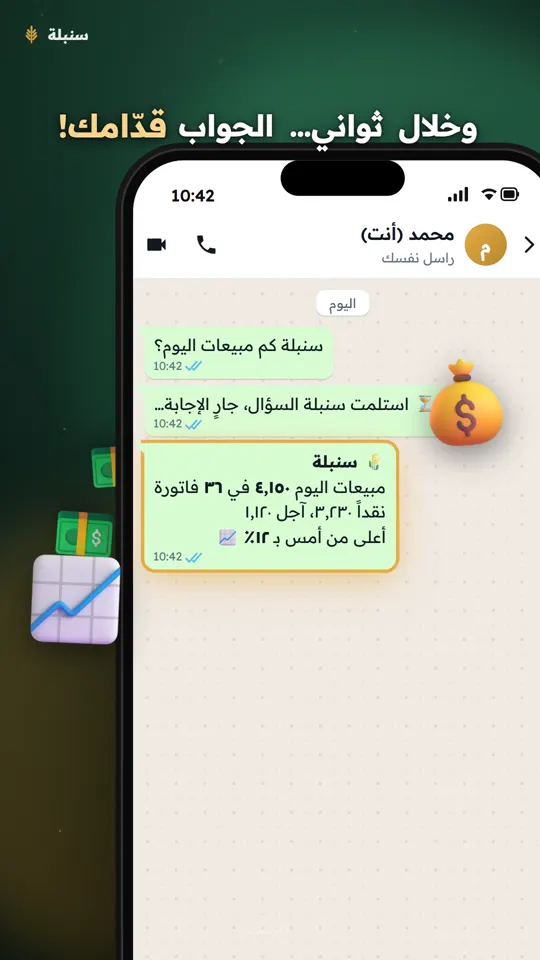
Every WhatsApp account has a chat with its owner, shown under your name with “You”, which many people use for notes. When you write a message there that starts with the word سنبلة (Sonbola, in Arabic) on the shop’s number linked to Sonbola, it is treated as a question:
- A waiting line arrives at once: “⏳ Sonbola got your question, answering…”.
- Sonbola AI reads your company’s books and works out the answer. It only reads: it creates no invoice and changes no figure.
- The answer arrives in the same chat under the heading “🌾 Sonbola”.
Notes you write to yourself without the word stay notes and are left alone.
2. What do you need first?
- The shop’s number linked to Sonbola: the WhatsApp number the program sends invoices and messages from, linked in the WhatsApp settings.
- Sonbola AI switched on for your company: the answer comes from the same assistant you use inside the program. See Sonbola AI.
- The company’s owner switches the feature on; it stays off until they do.
- Who answers: if your company is on Sonbola Web, the server answers at any time. If it runs on the Windows program, the program must be open and online on at least one of the shop’s computers.
3. Switching it on step by step
- Open the WhatsApp settings: in the Windows program from the WhatsApp settings button; on Sonbola Web from Settings, then WhatsApp.
- On the “Talk to your program from WhatsApp” card press “Switch on”. The status changes to “On: talk to your program from WhatsApp now.”
- On the phone that holds the shop’s number, open WhatsApp and find the chat with yourself (your name with “You” in the contacts list).
- To try it, send the word سنبلة on its own. Sonbola replies with a greeting and example questions.
To stop: press “Switch off” on the same card, and your notes to yourself are plain notes again.
4. What does a conversation look like?
سنبلة how much did we sell today?
⏳ Sonbola got your question, answering…
🌾 Sonbola
Today’s sales are 4,350 in 38 invoices, 1,120 of it on credit. Shall I show you the largest invoices?
Yes
⏳ Sonbola got your question, answering…
Made-up figures for illustration.Note the last reply: after every answer the chat stays open for three minutes, so anything you write there, such as “yes” or “and yesterday?”, is read as a follow-up without repeating the word. After three minutes the rule returns: a question starts with the word.
5. Ask by voice
If your hands are busy, record a voice note in the same chat that starts with “Sonbola” or “Ya Sonbola” in Arabic, such as “يا سنبلة كم رصيد الصندوق؟” (Sonbola, what is the cash balance?).
- Sonbola turns the voice into text and answers, showing what it heard at the top of the answer with 🎙️ so you can check it understood.
- If it cannot hear the note, it says so and asks you to type the question.
- Turning voice into text counts against your company’s AI allowance; typed questions follow Sonbola AI’s usual rules.
6. Limits
- Read only: you ask and learn; creating and editing happen inside the program.
- A closed desktop program: if no program answers within three minutes you receive: “⚠️ Sonbola did not answer within 3 minutes: make sure the program is open and online, then ask again.”
- Not counted against your message package: the waiting line and the answer go from your number to your number, so they are not deducted from the daily or monthly message limit.
- The answer is only as good as the records: a sale not recorded as an invoice is unknown to the program.
- Sensitive figures are the owner’s: the question comes from the shop’s own number, and the assistant answers with what the company’s owner may see.
Frequently asked questions
Do I need a new WhatsApp number?
No. You ask from the chat with yourself on the shop’s own number linked to Sonbola; no other number is added to your chats.
Do questions count against my WhatsApp message package?
No. Messages from the shop’s number to itself are not deducted from the message limit. Turning a voice note into text counts against the AI allowance.
Does it work when the computer is off?
If your company is on Sonbola Web, yes. If it runs on the Windows program, the program must be open and online on one of the shop’s computers; otherwise you get a notice after three minutes.
Must I write the word in every message?
Yes, except within three minutes of the last answer, when “yes” or a follow-up question is enough.
Can Sonbola create an invoice from WhatsApp?
No. The feature is read only at this stage.