How does Sonbola work without internet?
Sonbola is an office program that is installed on Windows machines. Your database is saved on your device or on your server, and is not sent to our servers. So you issue invoices, make sales from the cashier screen, and print reports, without the program waiting for any communication.
Works without internet
- Sales invoices, purchases and returns
- Cashier screen, barcode and thermal printer
- Stores, items and inventory movements
- Receipt and payment vouchers and checks
- journal entries, reports and financial statements
It needs internet
- Upload the backup to Google Drive
- Send invoices and account statements via WhatsApp or text messages
- Connecting branches located in different regions
Choose the appropriate operating method
The program itself has its full advantages in all three ways; The difference is in where the data is saved and in your need for the Internet.
One device
The program and data are on the store device, without the need for the Internet, network, or any additional setup.
LAN
Several devices in the same place operate on the same data via the store’s internal network, and each employee has his own permissions.
Connecting branches
For branches in different regions: Data on a shared server to which each branch connects via the Internet, with a unified report for all branches.
Your data is saved even without the cloud
The program provides backup and recovery tools, and you decide where to keep your copy:
- On the device itself .
- On a USB memory Store it outside the store.
- On your Google Drive Directly from within the program, with access limited to files created by the program only, and uploading takes place directly between your device and Google servers.
Taking backup copies regularly and verifying their integrity is the user's responsibility, so we recommend activating backups on Google Drive and keeping a copy outside the device. How do we handle your data?
On-premises or cloud accounting software?
Each type has its advantages, and the most suitable option depends on the nature of your business and the stability of the Internet in your area.
| Standard | Local program like Sonbola | Cloud software |
|---|---|---|
| When the Internet is out | Work continues on the device | Relies on communication for most tasks |
| Data location | On your device or server | On the company's servers provided |
| Work from several branches | Via branch linking mode | Naturally available from anywhere |
| Backup | In your hand, with built-in tools and Google Drive | Usually handled by the provider company |
If the Internet is unstable in your area, or you prefer to keep your data with you, the local program gives you greater continuity in your daily work.
The till keeps selling when a branch loses the internet
When several branches work on one server over the internet, a dropped connection in a branch no longer stops its till. Since version 1.7.5:
- Selling continues: in cash or by card, on credit to customers of the copy kept on the PC, and the shift opens and closes.
- Receipts are kept encrypted on the PC and uploaded by themselves when the connection returns, never twice.
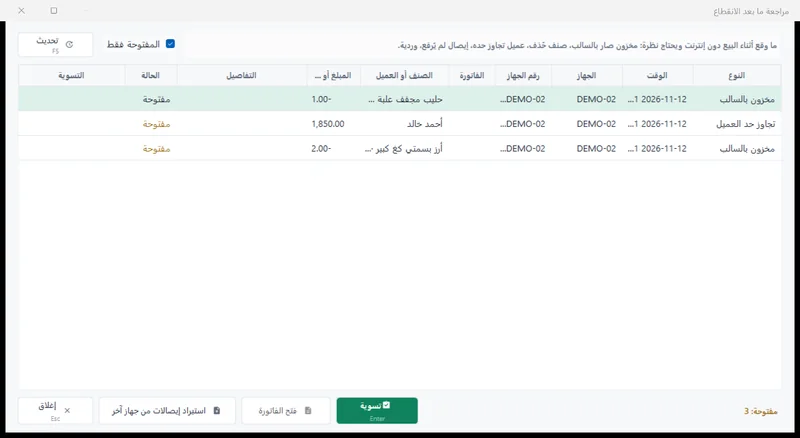
- After the outage: a «review after the outage» window shows what needs your attention, and waiting receipts can be moved in a password-protected file.
- Watching the tills: a «Till devices status» window shows every till as online, waiting, silent or closed, and silent tills appear in the daily management report.
- Off by default: switched on for the company in its settings and for the user by a privilege; not available to a company linked to ZATCA.
Frequently asked questions
Does the program work completely without the Internet?
Yes. Everyday operations, from billing and cashiers to warehouses and reports, run on your device offline. You only need the Internet for features that depend on it by nature, such as uploading your backup to Google Drive, sending via WhatsApp, and connecting branches.
Will my data be lost if my device crashes?
If you have a recent backup outside the device, you can recover your data from it. Therefore, we recommend activating backup on Google Drive, or keeping a copy on a USB memory regularly.
Can it be played on more than one device without the Internet?
Yes. In local network mode, multiple devices in the same place operate on the same data across the internal shop network, and each additional device is added by a $60 annual subscription.
Is there a free accounting software without the Internet?
Sonbola is not permanently free, but you can try it for free for 30 days with all its features and without a payment card, and it works without the Internet on your device. And Accounting offices You get a free permanent copy. As for completely free programs, they often have no support, no updates, and no local tax report, so calculate the cost of errors before the subscription cost.
Can I try it before I buy?
Yes. The free trial is fully featured for 30 days and without a payment card, and the program comes with a ready-made training company that you can practice without compromising your data.
Have another question? Browse the help page Or Contact us .
Try a program that does not stop when the Internet is out
A full 30-day trial, without a payment card, with a training company ready to practice.
Try it free for 30 daysOr get to know All the advantages of Sonbola .