How much did I earn this month?Profit from the report, available to the business owner.
Who needs a balance reminder?Follow overdue balances and explore message preparation when enabled.
What stock needs attention?Review items at their reorder level before preparing a purchase.
New · from your WhatsApp
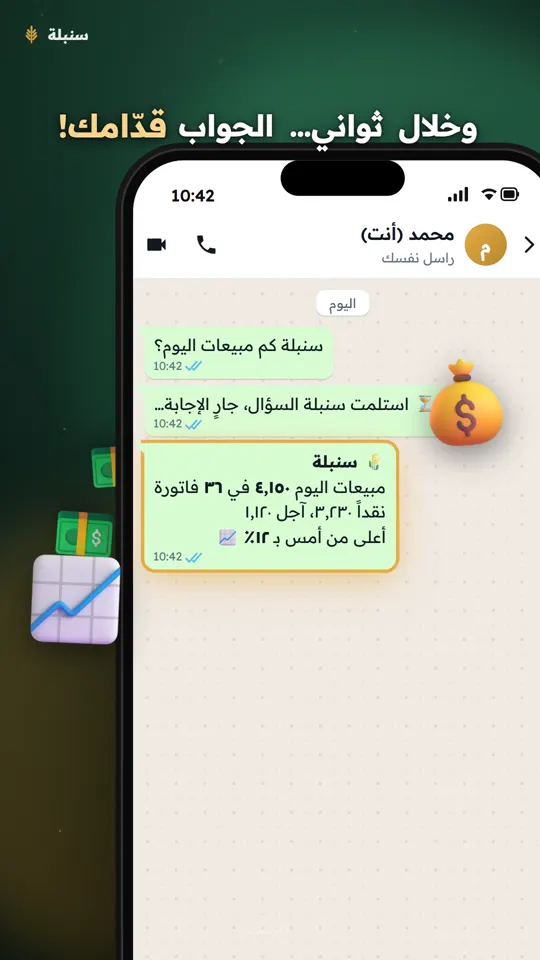
Talk to your program… and it talks back
Message yourself on WhatsApp “Sonbola, how much did we sell today?” or record the question as a voice note, and the answer from your shop's books arrives within seconds, even when you are out of the shop.
From your own number: no new number, no extra app.
Type it or say it in a voice note.
Today's sales, customer debts, items running low, and more.
With Sonbola Desktop the program answers while it is running on the shop's computer. The figures in the video are illustrative. The video is in Arabic.
Choose how to use Sonbola
Sonbola Web
Try Sonbola in your browser free for 14 days and explore its suitability for your business.
Features and setup differ by version. Contact us to confirm the functions and connections your business needs before choosing a plan.
Everyday challenges for business owners
Examples of tasks supported by desktop editions; features vary by plan. See the Web page for browser functions.
Do they owe me, or do I owe them?
See a statement and closing balance for each customer and supplier, with an aged receivables report to identify overdue payments and how long they have been outstanding.
I ran out of stock without noticing
Track each product in each warehouse, with a reorder-level alert and alerts for products approaching their expiry date.
I need to see the profit on an invoice with products and services
Combine products and services on one invoice and use a profit report to review product and invoice profit. Check how costs and expenses are treated when assessing profit.
A customer disputes their outstanding balance
Send their invoice or statement via WhatsApp or SMS from the software as you work, so they can review their account and discuss any differences.
The month is ending, and I am buried in paperwork
A VAT report separates taxable and exempt transactions and calculates the net amount due from your invoice data.
What if my computer breaks down?
Save a backup to Google Drive so you have a copy of your data if you lose the device.
Real screens from Sonbola
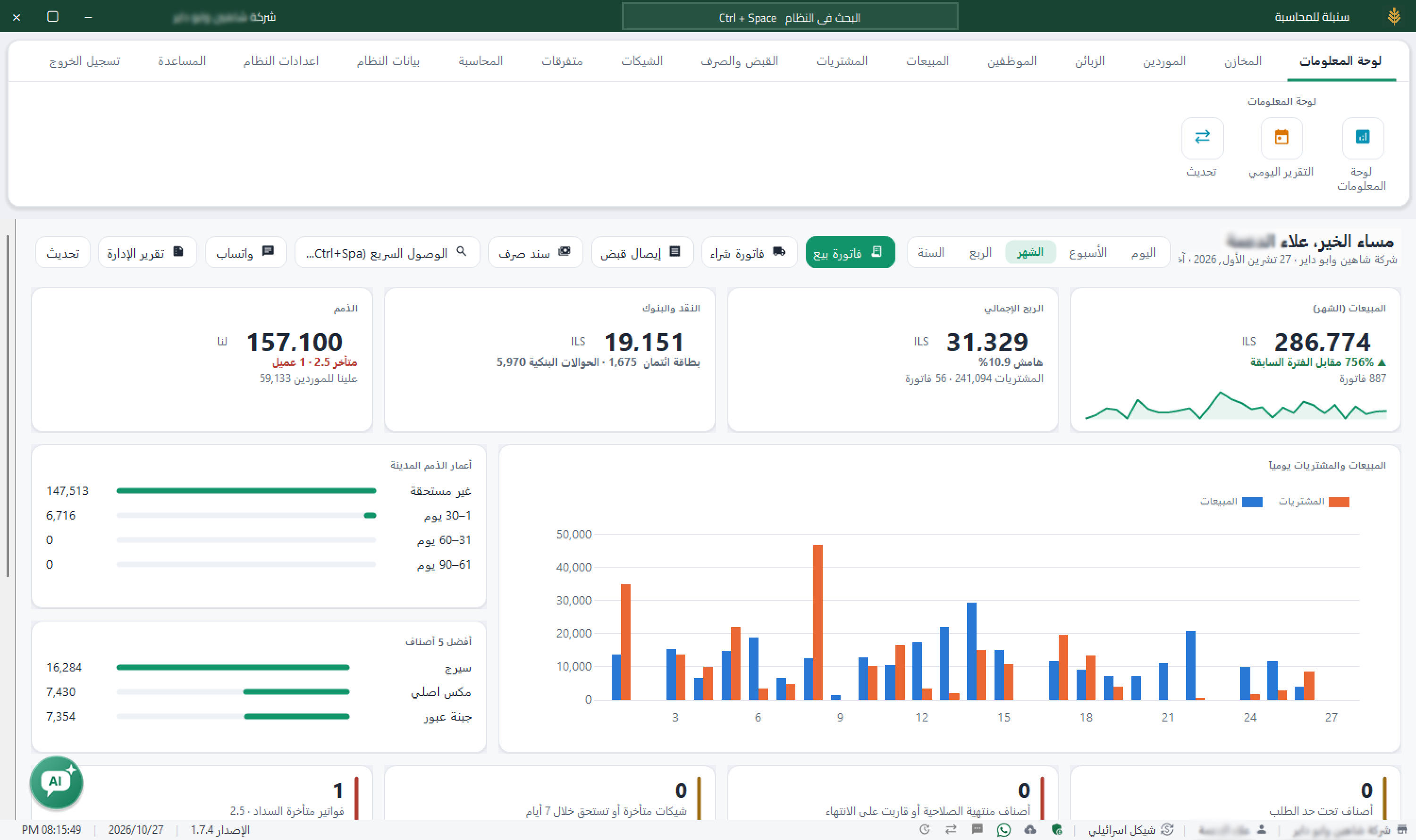
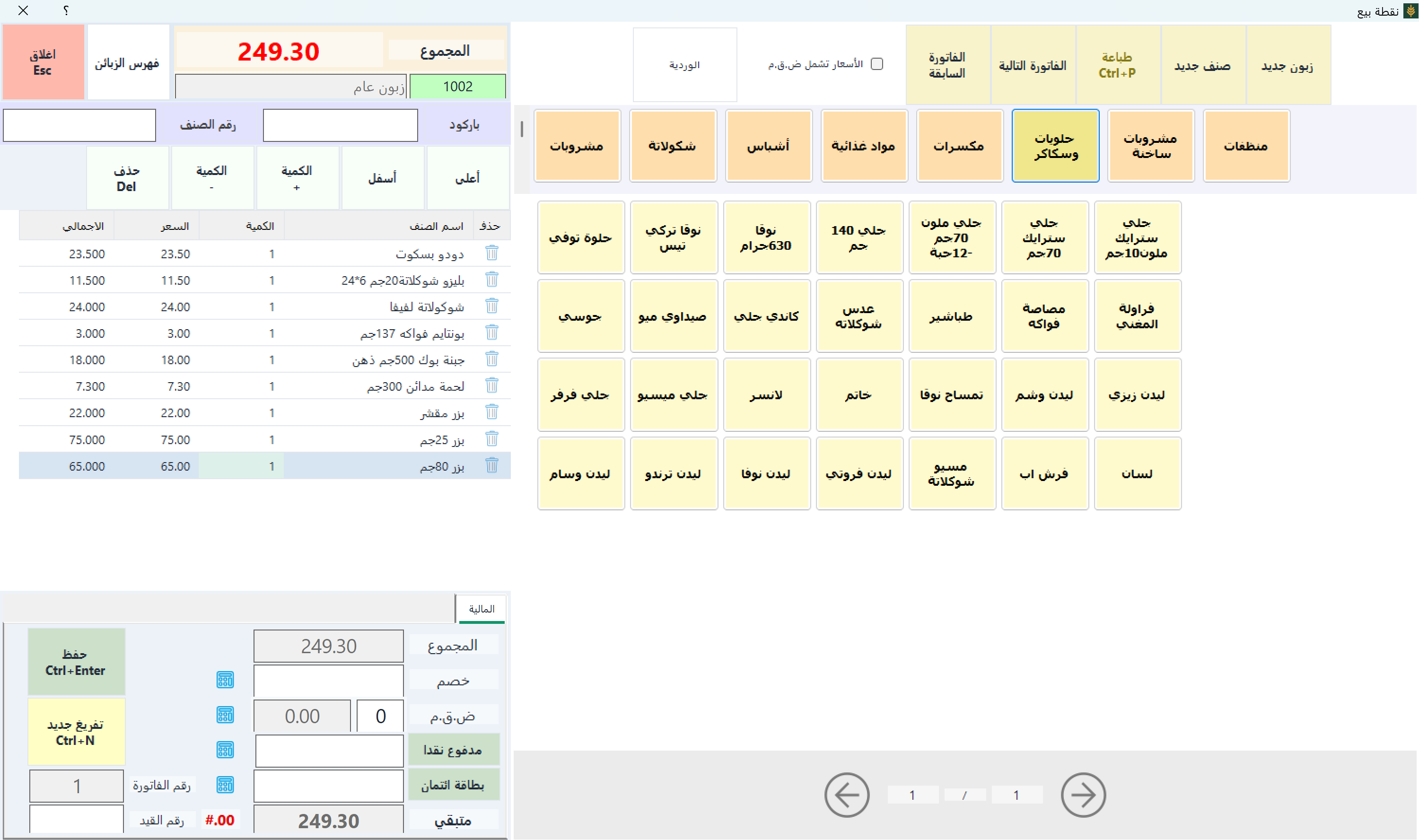
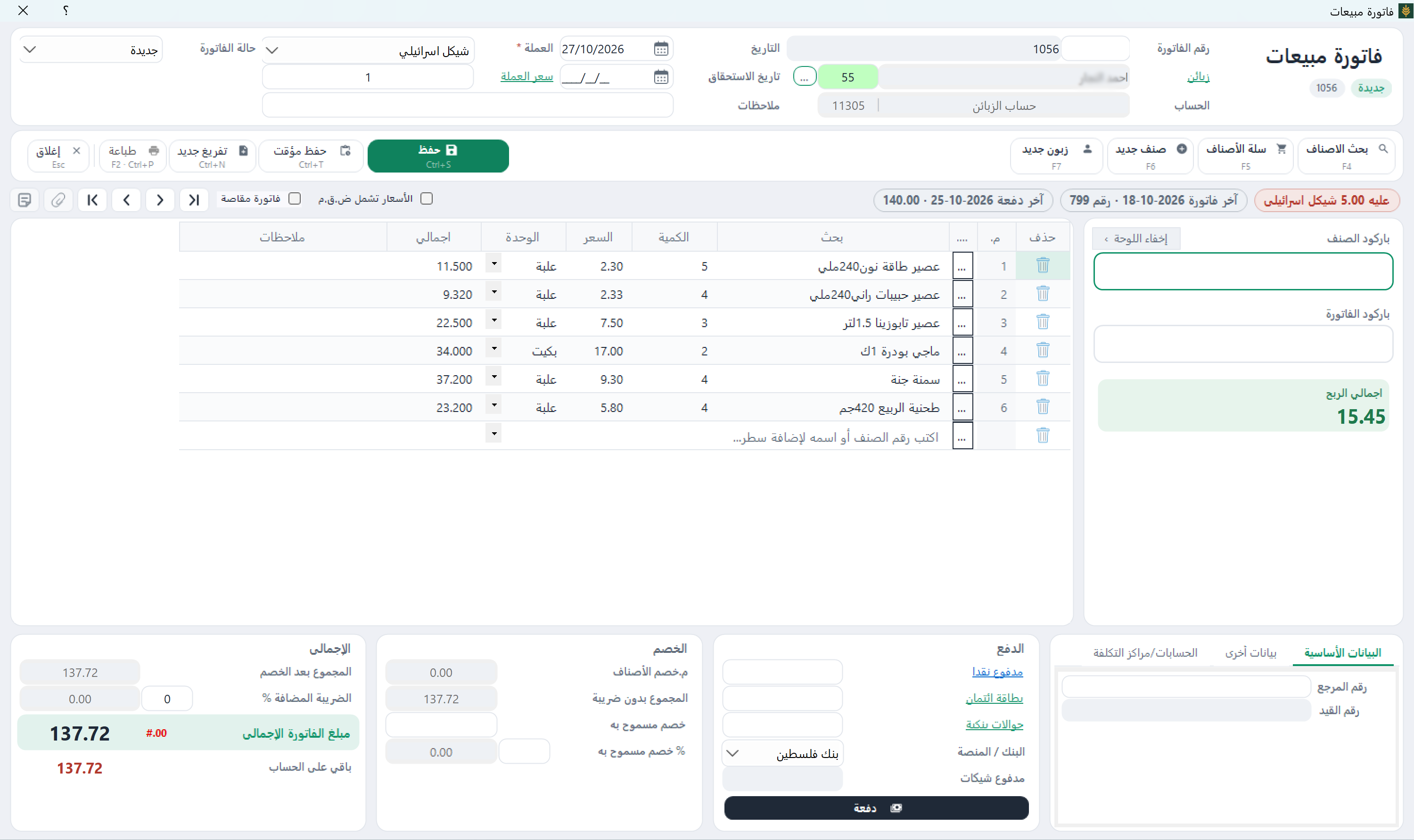
Actual screenshots of Sonbola for Windows, shown in its Arabic interface. Select any image to enlarge it.
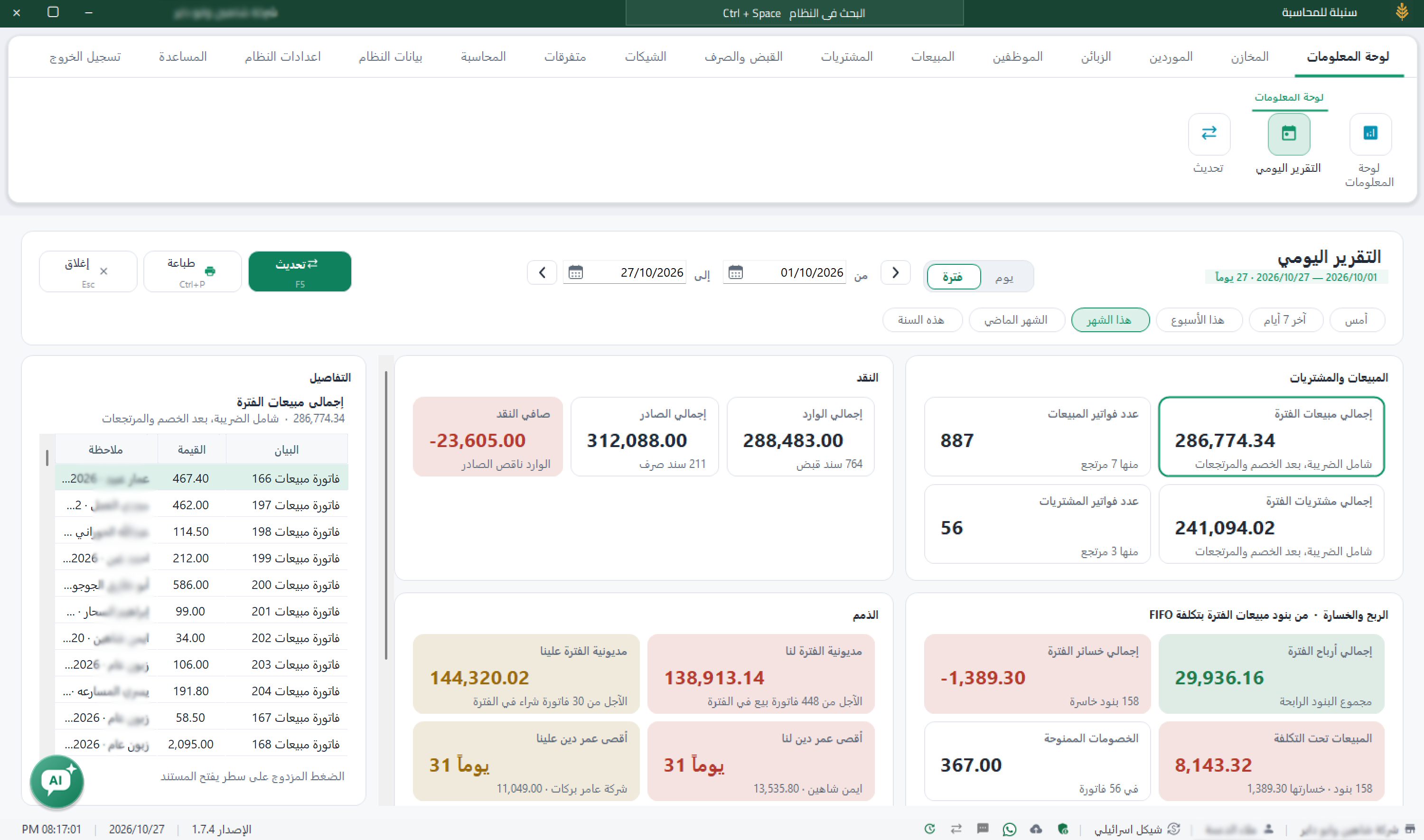
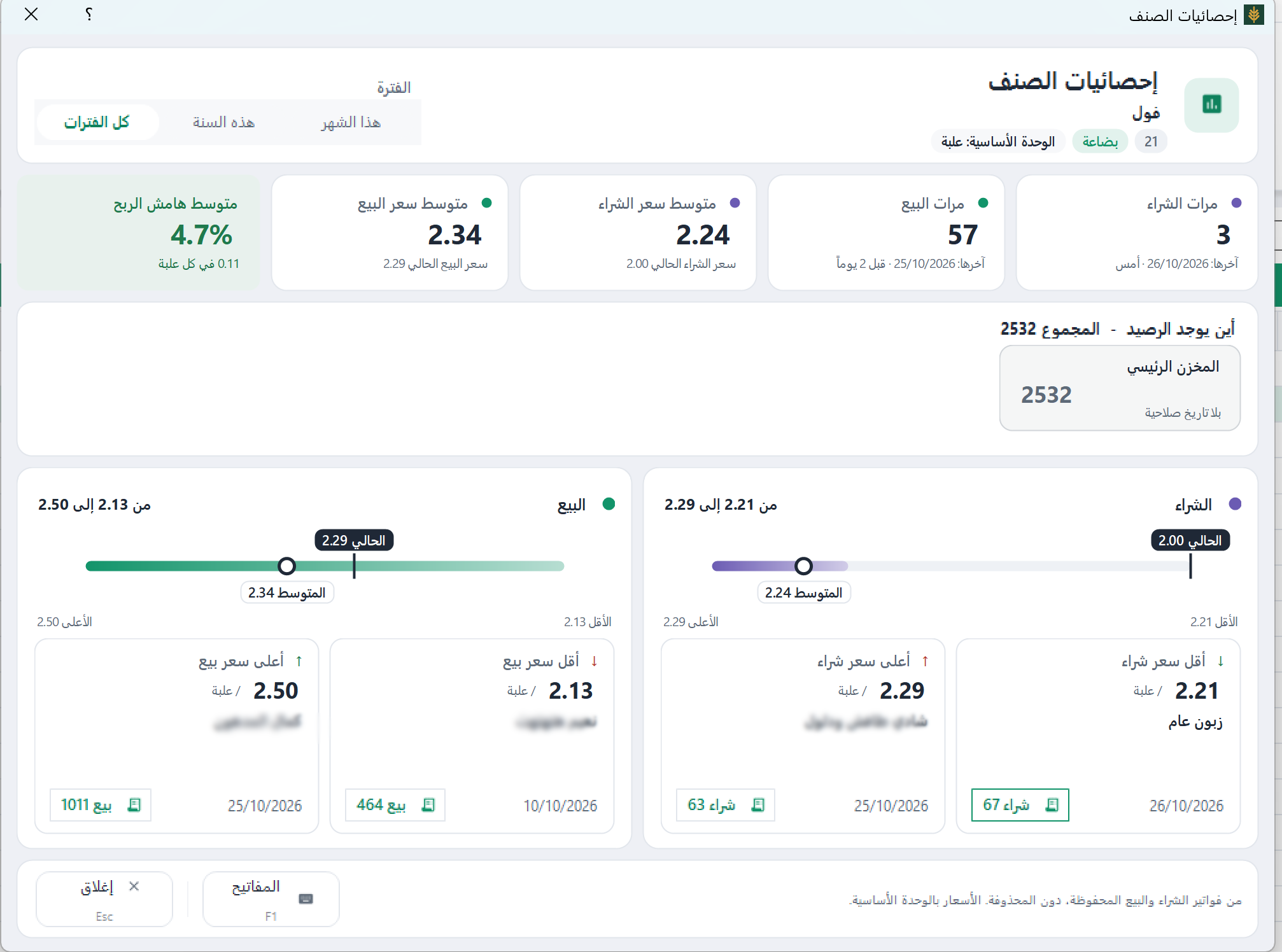
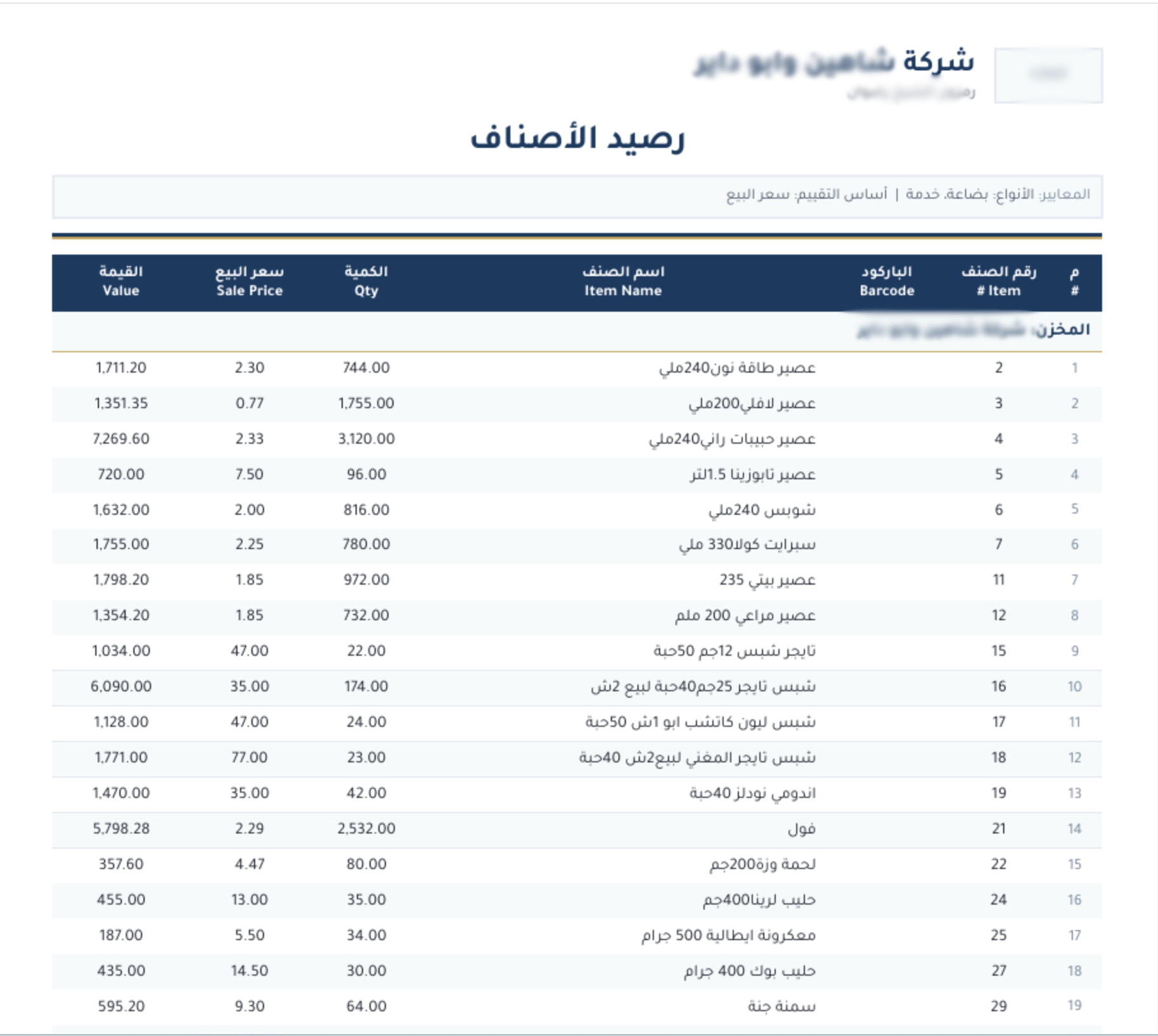
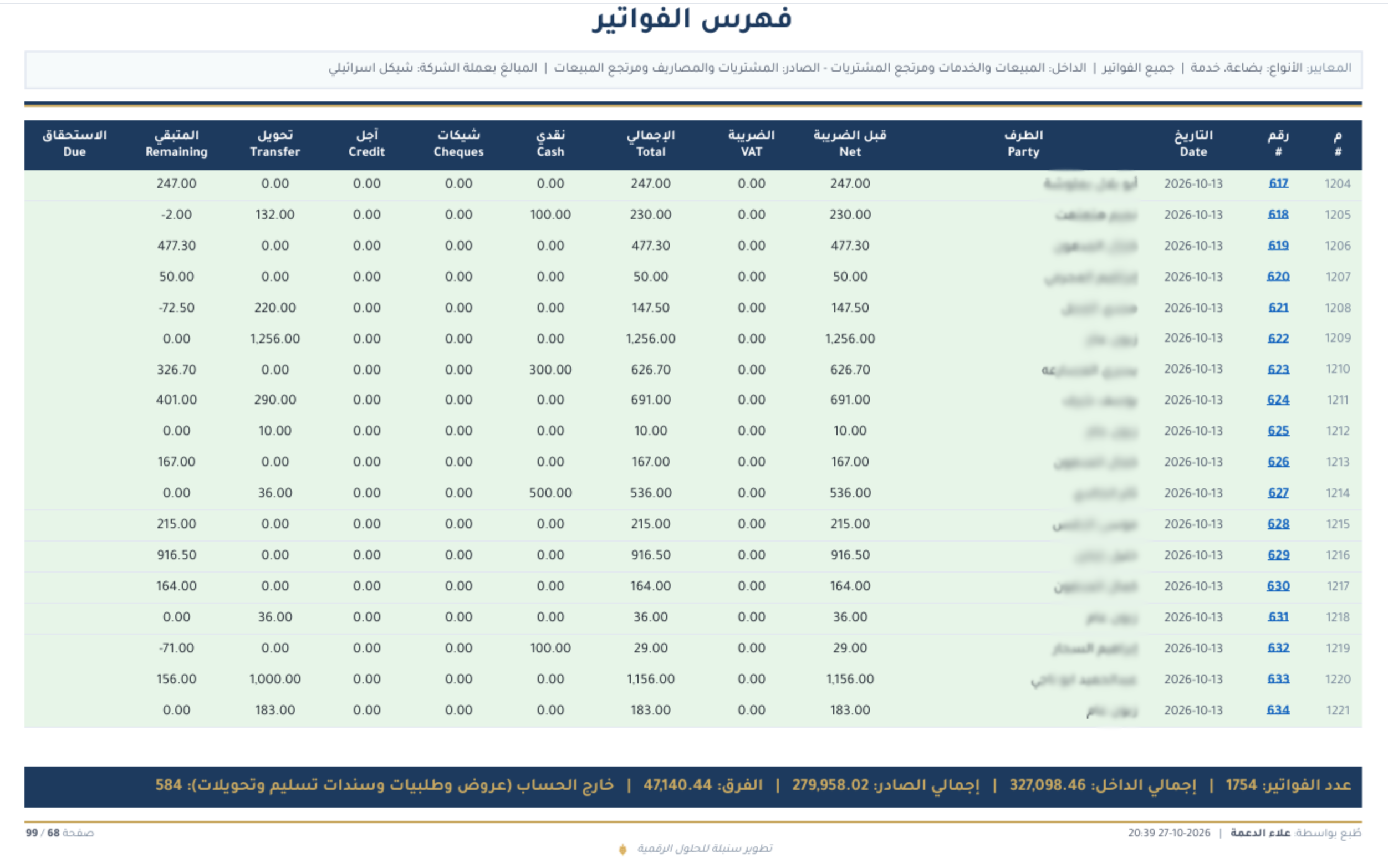
Enlarge image ↗DashboardSales, gross profit, cash and outstanding balances, with charts and alerts.Enlarge image ↗Point of saleProducts, barcode entry, the sales basket and payment fields on the POS screen.Enlarge image ↗Sales invoiceInvoice items, quantities, discounts, tax, payments and the displayed invoice profit.Enlarge image ↗Daily reportReview period sales, purchases, cash movements, receivables, payables, profits and losses.Enlarge image ↗Item statisticsAverage purchase and sale prices, profit margin and warehouse stock for an item.Enlarge image ↗Stock balanceA report of item quantities, sale prices and stock values by warehouse.Enlarge image ↗Invoice indexReview invoice amounts, payment methods and outstanding amounts in one report.
What does Sonbola include?
The features below describe desktop editions and vary by plan. See Sonbola Web for browser features.
One program covers your workflow, from your first invoice to your final report. Features depend on your edition, so choose what your business needs.
Sales and POS
Sales invoices and returns, with discounts and tax
Barcode POS with multiple payment methods
POS shift closing and cash reconciliation
Quotations and sales orders that can be converted to invoices
Service invoices and consignment goods
Send invoices and account statements via WhatsApp or SMS from within the software
Sales representatives and drivers, commissions and delivery charges
Purchasing and expenses
Purchase invoices and returns linked to suppliers
Purchase orders and purchase quotations
Expense invoices posted to their accounts
Inventory and products
Multiple warehouses with product balances for each location
Manual or automatically generated barcodes
Multiple units per product and five selling prices
Batch and expiry-date tracking
Warehouse transfers, goods issue and goods receipt documents
Manufacturing and assembly from components
Import products, customers, suppliers, your chart of accounts and journal entries from Excel
Customer and supplier accounts
Account details including tax number and currency
Credit limits and payment terms for each account
Detailed account statements and outstanding balances
A default pricing level for each customer
Cash and cheques
Receipt and payment vouchers with multiple lines
Cash, card, transfer and cheque on one voucher
Incoming and outgoing cheque workflows
Endorse incoming cheques to another party
Accounting and tax
Chart of accounts and balanced journal entries
Automatic entries from invoices and vouchers
VAT report
Trial balance, income statement and balance sheet
Cost centres and financial year closing
Multiple currencies with a transaction-specific exchange rate
Reports
More than 70 reports, statements and financial reports
Dashboard for sales, profit, cash and outstanding balances
Product profit and best-selling products
Export to Excel, PDF and Word
Arabic and English versions of each report
User and employee management
Detailed access permissions for viewing and editing
Limit staff access to a specified warehouse or branch
Profit figures visible only to the owner
User sign-in and sign-out records
Employee details, payroll and attendance
Choose your version Tell us about your business and we will help you choose an edition.
What Sonbola customers say
Four businesses from different sectors, each with its own challenges.
Average customer rating: 5 out of 5, based on 4 reviews.
Customer rating: 5 out of 5
I used to feel apprehensive about software, but this is the easiest accounting program I have used. It has helped me a great deal with managing my accounts.
Customer rating: 5 out of 5
Our work revolves around outstanding balances and payments. We used to keep paper records, and lost track of a substantial part of what was owed, with repeated disagreements with patients. Now one page brings each patient's account together, and we can keep track of their balances.
Customer rating: 5 out of 5
We have several branches, and clothing design orders reach different departments. I used to lose track of them. The software helped me fulfil each order on time with the correct design and manage the work properly.
Customer rating: 5 out of 5
My biggest challenge was calculating net profit, because one invoice includes both products and services, and maintenance takes time and involves many details. The software brought order to my maintenance and service invoices, and my financial management has improved a great deal.
Solutions for your sector
Every business has its own details. Choose your sector to see how Sonbola addresses day-to-day challenges and which edition suits you.
These are deployment options for Windows desktop, distinct from Sonbola Web and the Android companion. Discuss the setup for your devices and branches with our team.
Single computer
One shop, one computer
The software and data stay on your shop computer, without needing an internet connection or network.
Local network
A showroom, warehouse and accountant under one roof
Several computers on the same network work with the same data at the same time, with individual staff permissions.
Connected branches
Two or more branches in different locations
Data is stored on a shared server, allowing you to follow activity at each branch and produce a combined report.
These plans are for Windows desktop. Sonbola Web is a single plan: USD 22 per month or USD 200 per year for one user, plus USD 5 per month for each additional user.
Annual subscriptions include updates and technical support throughout the year. Try the software free for 30 days before paying. See all prices on one page.
POS
Retail shops, grocery shops, boutiques and small pharmacies
220 USD / year
Sales invoices and returns
POS, barcode and thermal printer support
Basic inventory and reorder alerts
Customers, outstanding balances and statements
Sales and product profit reports
Most requested
Trade
Wholesale, building materials, spare parts, maintenance and clinics
380 USD / year
Everything in POS
Multiple warehouses and transfers
Multiple units and five selling prices
Batch and expiry-date tracking
Manufacturing and component assembly
Purchase orders, sales orders and quotations
Services and products on one invoice
Accounting
Businesses with an accountant or auditor
499 USD / year
Everything in Trade
Chart of accounts and journal entries
VAT and financial statements
Incoming and outgoing cheques
Employee payroll and attendance
Multiple currencies and cost centres
Add-ons
Setup and training. Contact us to arrange setup and training, with Arabic support on WhatsApp. Training is currently free. Confirm service availability in your area and arrange a time. Sonbola by country.
Additional computer on the same network: USD 60 per year.
Connect branches in different locations: USD 200 per year in addition to your edition's subscription. Hosting is charged separately.
Setup and training optionsTraining is currently free. Contact us to confirm availability and arrange a time in your area.
The desktop version includes a complete training company with products, customers, suppliers and three months of invoices. Practise freely; its invoices do not count towards your trial period.
Get started in minutes
You do not have to enter products one by one. Import products, customers, suppliers, your chart of accounts and journal entries from Excel in one batch, and start invoicing the same day.
You control your data
Desktop data is stored on your computer or server, with local and Google Drive backup options. Sonbola Web runs in your browser. Data across versions is covered by our privacy policy.
Technical support in Arabic
Contact us on WhatsApp for support in Arabic. Explore Sonbola by country.
Free video tutorials
A video library explains the main screens step by step and remains available as a reference for you and your staff. Browse the tutorials
Desktop printing and barcodes
Use a standard barcode reader and print an A4 invoice or a compact thermal receipt, as well as product labels.
Built for Arabic
Sonbola was designed for Arabic use from the outset. Screens and reports follow a right-to-left layout, with an English version of each report when needed.
Frequently asked questions
Does Sonbola use AI in accounting?
Yes. Sonbola AI is an intelligent assistant inside Sonbola Web and the updated Windows desktop version. Ask about sales, profit, inventory and customer balances using the reports and tools available to your account. Access depends on permissions and activation.
Does Sonbola AI find and fix errors automatically?
Sonbola AI can help investigate differences in company records when you ask. It does not continuously audit every record or automatically correct a balance sheet. Messages and changes require the relevant service, permissions and user review.
What is Sonbola accounting software?
Sonbola is accounting, sales and inventory software with Arabic and English support in the interface, reports and invoices, for shops and businesses. Choose Sonbola Web in your browser or the Windows desktop version, with an Android companion for stocktaking and synchronization with desktop or Web. Features and connections depend on the version and plan. Meet the company
How do I start my free trial?
Try Sonbola Web free in your browser for 14 days, or download desktop: the default trial is 30 days or 500 invoices, whichever comes first. Choose your version on the download page and contact us for assistance and training.
What happens when the trial ends? — desktop
The software switches to read-only mode. Your data remains available to view and export, but creating and editing documents stops until you activate a subscription.
Does the subscription renew automatically? — desktop
No. Renewal is arranged directly with you. We notify you before expiry, with a grace period during which the software continues to work with all its features.
Where is my data stored, and can you access it? — desktop
Desktop company data is stored on your computer or server. Connected services such as Sonbola AI, messaging and cloud backup use the data needed to provide the service. Support may access information you share when requesting help. Google Drive backups use your own account with access limited to files created by the software. Read our privacy policy
Can I import my data from Excel? — desktop
Yes. Import products, customers, suppliers, your chart of accounts and journal entries from Excel in one batch and start invoicing the same day.
Who is Sonbola for?
Sonbola serves shops and small and medium businesses, including supermarkets, pharmacies, building materials and spare parts shops, and clinics. Choose an edition based on the inventory, accounting entries, currencies and reports you need.
Does Sonbola work offline for retail shops? — desktop
Windows desktop can work locally without internet. Sonbola Web requires internet, as do remote connections, sending services and cloud backups. Your device still needs power.
Does Sonbola support multiple currencies? — desktop
The Accounting edition supports multiple currencies. Review currency and exchange-rate settings with your accountant and test transactions in the training company before going live.
Does it support VAT? — desktop
The Accounting edition includes a VAT report. Review the rate and tax treatment with your accountant under current requirements. The report does not replace checking your data and tax return.
How can I arrange setup and training?
Contact us to arrange setup and training, with Arabic support on WhatsApp. Training is currently free. Confirm service availability in your area and arrange a time.
Try Sonbola Web free in your browser for 14 days, or download desktop: the default trial is 30 days or 500 invoices, whichever comes first. Choose your version on the download page and contact us for assistance and training.
Accountants receive a permanently free office edition, software training and a commission for each customer they refer. If you manage accounts for clients who could benefit from Sonbola, get in touch.
Articles from the learning centre, covering the questions shop owners ask first: choosing a version, reading the figures, invoices, stocktaking and VAT.
Explore furniture and clothing starter lists in Excel and CSV. Preview the items, edit your copy and read the preparation guide before importing into Sonbola.