You bought an item for 100 shekels and want to make 20% on it. Do you sell it for 120 or 125? Both are right, but each answers a different question. Mixing them up makes many shop owners think their profit is higher than it is.
The figures here are training examples without tax, to illustrate the calculation.
1. Markup and margin: what is the difference?
- Markup is calculated on cost: profit ÷ cost.
- Margin is calculated on selling price: profit ÷ selling price.
If cost is 100 and price is 120, profit is 20. Markup is 20% (20 ÷ 100), but margin is 16.7% (20 ÷ 120). Same amount, two different percentages.
2. The two formulas you need
| What you want | Formula | Example: cost 100, 20% |
|---|---|---|
| A markup on cost | Price = cost × (1 + rate) | 100 × 1.20 = 120 |
| A margin of the price | Price = cost ÷ (1 − margin) | 100 ÷ 0.80 = 125 |
If your goal is to keep 20% of every shekel you collect, use the margin formula.
3. Discounts eat margin faster than you think
An item costing 100 sells for 125 (20% margin). You give a 10% discount, so the price becomes 112.5. Profit drops from 25 to 12.5, half, even though the discount was only 10%.
Practical rule: before giving a discount, calculate how much profit remains in shekels, not in percent.
4. When the purchase price rises
The first batch cost 100 and you sell at 125. The new batch costs 115. If you keep selling at 125, your profit on the new batch is only 10 and your margin 8% instead of 20%.
- Record the cost of each purchase invoice as it is, not the old price from memory.
- Review the selling price whenever cost changes, especially for fast-moving items.
- Watch for items sold at a loss without noticing; they may explain “the shop sells but does not profit”.
5. One price does not suit every customer
Wholesale customers, contractors and walk-in customers rarely buy at the same price. Instead of editing the price manually on each invoice, define price levels in advance and calculate each level’s margin.
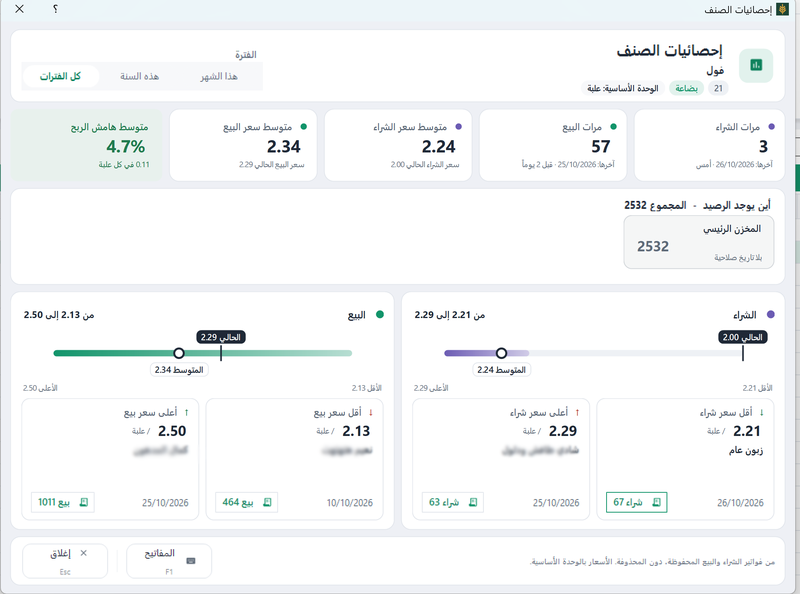
In Sonbola: each item has five selling prices, each customer a default price level, and the item statistics screen shows average purchase and selling prices, profit margin and stock balance. Sonbola AI can answer which items you sold at a loss, subject to permissions and activation.
6. Item profit is not shop profit
Even with good margins on every item, rent, electricity and wages are paid out of the total of those margins. Read also invoice profit is not shop net profit.
Frequently asked questions
What is the difference between margin and markup?
Markup is calculated on cost, margin on selling price. So for the same profit, margin is always lower than markup.
How do I price an item for a 20% margin?
Divide cost by (1 − 0.20). An item costing 100 sells for 125 to keep 20% of the price.
Should I change the price at every cost increase?
At least review it for fast-moving, low-margin items, because a small cost increase can wipe out most of the profit.
Does Sonbola show item profit margin?
Yes. The item statistics screen shows average purchase and selling prices, profit margin and item balance.