When one shop becomes several
- Every branch’s sales and cash must be known on their own, and the whole company together.
- A branch employee should see his branch, not the others.
- The owner wants to compare the branches without exporting and merging sheets.
- A branch should not stop selling because the internet dropped.
How it works in Sonbola
- Branches and their stores: every company is its own main branch and can have others; a branch can hold several stores («Branch» on the store card).
- Every document by its branch: every invoice, voucher, shift and manual entry carries its branch, every branch has its own cash box, and every posting takes the branch’s account first.
- Each user sees his branches: the reports, invoice and voucher lists, dashboard, management report and alerts come by his branches; the working branch shows on the screen. The financial statements stay for the whole company.
- «Branch» in the report criteria: «All branches» or one of the user’s branches, kept with the criteria.
- The «Branch comparison» report: one row per branch with its sales, returns, profit, purchases, receipts, payments and balances.
- A company without branches sees no difference at all.
One server for every branch
- The program connects to the business’s server over the internet with an encrypted connection and a real certificate, and says why when it refuses a connection.
- A «link code» fills the connection settings; saving them tries the server first.
- A line on the sign-in page and the status bar says where the database is.
- The licence can be for the database with a number of PCs, with a «Devices» card listing each PC.
- Server backups have their own card, with their state in the status bar and the daily reminder.
If the internet drops in a branch
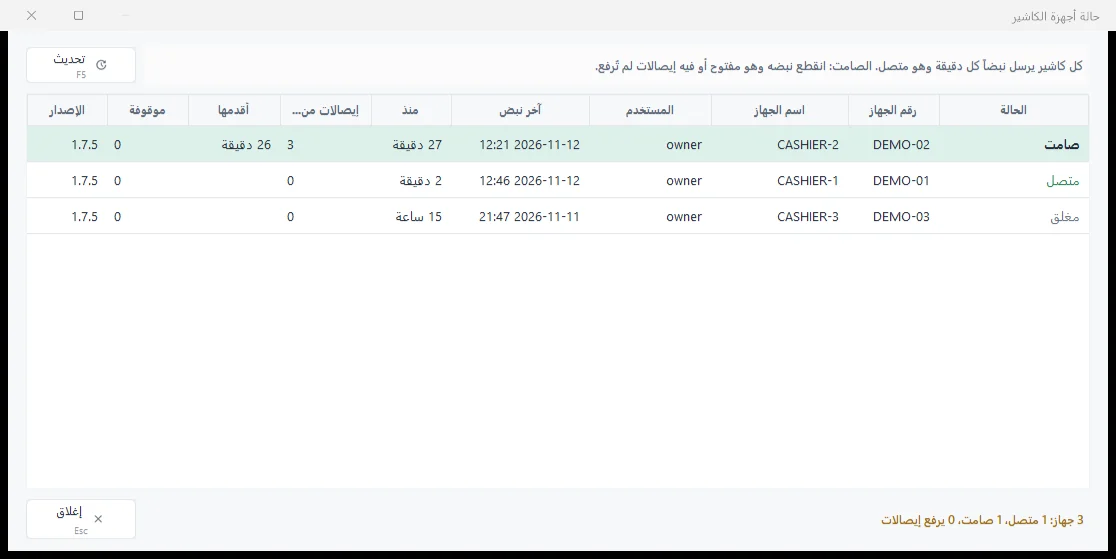
The «sell without internet» option keeps the till selling and uploads the receipts when the connection returns. A «Till devices status» window shows which till is online, waiting, silent or closed.
Questions
Does a branch employee see the other branches’ data?
Not unless you give him the right. A user who does not hold every branch gets the reports, invoice and voucher lists, dashboard and alerts of his branches only, and a link to another branch’s document does not open. The financial statements stay for the whole company.
Can a branch have more than one store?
Yes. «Branch» is chosen on the store’s card, and ticking a branch in the privileges ticks all its stores.
How do the branches connect?
All branches work on one database on the business’s server over the internet, through an encrypted connection with a real certificate; the program never connects unencrypted. A «link code» fills the connection settings on each PC.
What happens if a branch loses the internet?
With the «sell without internet» option on, the branch’s till keeps selling and uploads the receipts by itself when the connection returns, never twice. The option is off by default and is not available to a company linked to ZATCA.
How much does linking branches cost?
Linking branches in different areas is 200 dollars a year on top of your edition’s subscription, with hosting charged separately. Details on the pricing page.
Branches came in Sonbola 1.7.5: what’s new in 1.7.5. Restaurants: tables and orders.