What a restaurant needs from its till
- Seeing at a glance which tables are free, busy or waiting for their bill.
- An order that reaches the kitchen right, with only what was added since the last send.
- Dine-in, takeaway and delivery in one screen.
- Knowing what was cancelled after it reached the kitchen, and why.
- Closing the bill in cash or by card, and a clean shift at the end of the day.
How it works in Sonbola
The tables board
Every table is a card in the colour of its state (free, busy for so many minutes, bill printed, reserved) with its guests and amount, and every hall shows how many tables are free and busy. A switch above the board moves between «Items | Tables» (F3).
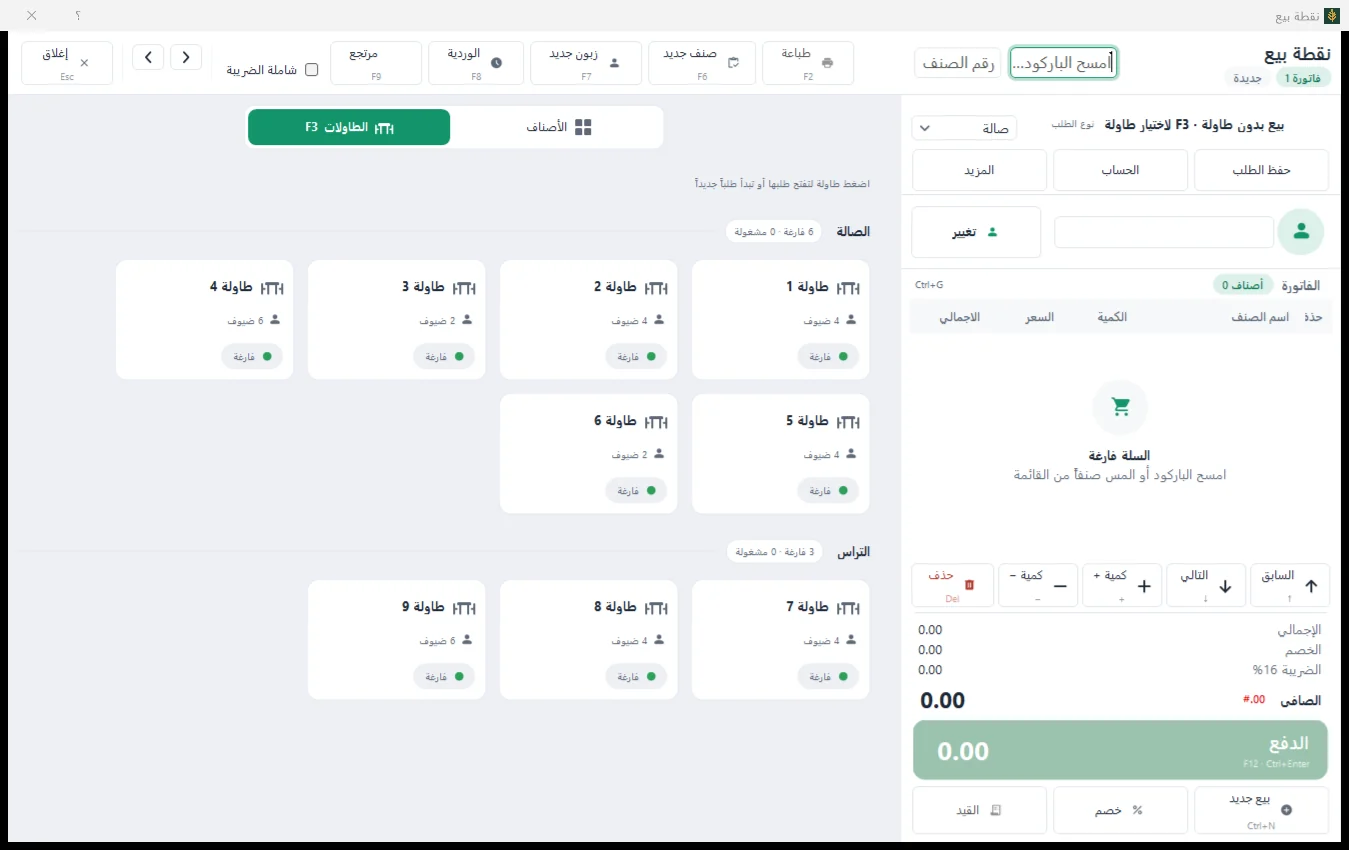
- One order per table: dine-in, takeaway or delivery.
- To the kitchen: every save sends what is new to the kitchen printer, with a printer per category if you like; or a kitchen screen that shows the orders.
- At the table: merge two tables into one order (by privilege), put the waiter on the order, reserve tables.
- Charges: an automatic service line and a delivery fee.
- Payment when the table closes: cash, or a button for every bank linked to the point of sale.
- The shift: a return from a receipt (F9), and the closed shift printed as one A4 invoice.
Reports for the restaurant
Two reports in the reports centre: «Tables and orders sales» (by waiter, area, table, order type or day) and «Cancelled after sending to the kitchen» (every quantity cancelled after it reached the kitchen, with the reason), beside the sales by hour and day and by payment method.
The point of sale itself was redesigned in 1.7.5: see what’s new in 1.7.5. Several branches? Multi-branch accounting.
Questions
Does the order print in the kitchen by itself?
Yes. Every save of the order sends only the new items to the kitchen printer, and you can set a printer per category (drinks to the bar and food to the kitchen, for example). A kitchen screen that shows the orders can be switched on too.
Does it handle takeaway and delivery?
Yes. Every order has its type: dine-in, takeaway or delivery, with a delivery fee.
Does it work without internet?
The desktop edition runs on the restaurant’s PC or its local network without internet. If you have several branches on a server over the internet, the «sell without internet» option keeps the till selling during an outage and uploads the receipts when the connection returns.
How do I switch the tables on?
From the tables card of the company settings. The new restaurant parts (merging, waiter, delivery, reservations, kitchen screen) stay off until you turn them on.
Can I try it before buying?
Yes. The free trial has every feature for 30 days, with no payment card. To find the right plan for your restaurant, contact us.