Sonbola SONBOLA

Home / Sector solutions / Pharmacies

Pharmacy accounting software: stock, expiry and POS

Track the expiry date of each batch, know when to order from the supplier, and sell quickly from the cashier screen — in a program that supports Arabic and English in the interface, reports and invoices, and runs on the pharmacy device without the Internet.

What should the best pharmacy management software do?

A pharmacy buys from medicine suppliers, sells by the pack and the strip, and every medicine has an expiry date. Sonbola brings the cashier, stock, expiry dates and supplier accounts together in one program that runs on the pharmacy computer without the internet.

The expiry date of each medicine

Enter the expiry date from the pack on the medicine’s line of the supplier’s purchase invoice. The expiry report lists items and their batches with their dates, and “items close to expiry” appears in the alerts every morning (Trade edition). The alerts screen

Pack and strip, by barcode

A medicine is an item with the pack’s barcode and a secondary unit such as the strip. Scan it on the cashier invoice and take cash, card or both; each amount goes to its own account. The cashier invoice

Suppliers and returns

Each supplier has an account and a statement you match at month end. A medicine recalled from the market? Turn the purchase invoice it came on into a return and keep only its line: it leaves stock and comes off the supplier’s balance. Purchase returns

Stocktake and shift closing

Expired and destroyed stock leaves the store through the stocktake, and an assistant can count on a phone as a blind count. At the end of the shift the Z report matches the drawer. Stocktake

Try Sonbola in your pharmacy for 30 days · Read the item units tutorial

Common challenges for pharmacy owners

Four situations that occur frequently in pharmacies, and how Sonbola deals with them.

Medicines that expire on the shelf

Record each product’s batch number and expiry date to receive Alert about items that are about to expire Before it turns into a loss.

Running out of a popular product unexpectedly

Set a reorder limit for each item, and the program will alert you when stock reaches that level , to order it from the supplier at the appropriate time.

Selling by the box and blister strip

Define Multiple units for one item , such as boxes and blister strips, to match how your pharmacy sells medicines.

Warehouse and supplier accounts

Purchase and return invoices associated with each supplier, and Account statement See your receivables and payables, and record payments with payment vouchers.

Advantages of interest to pharmacies

barcode POS

Fast selling with a standard barcode reader, multiple payment methods, and a small thermal receipt.

Stock alerts

An alert at the re-order limit, and another alert for items whose expiration is approaching.

Item profits

Know the profit of each item and the best-selling items, to decide what to order more.

Employee permissions

Limit what each employee sees and edits, and profits are visible only to the owner.

Closing the shift

Close the cashier shift and reconcile the cashier at the end of each shift.

Works without internet

The software and your data on your pharmacy device, with a backup on Google Drive. How does it work?

The appropriate edition for your pharmacy

380 dollars annually

“Trade” edition

The Trade edition includes batch and expiry tracking, multiple warehouses and product units, plus everything in the POS edition. For a small pharmacy that only needs sales and simple inventory, the POS edition costs $220 per year. Compare versions

Which version of Sonbola suits your pharmacy?

In a pharmacy you sell from the counter and track stock and expiry dates, and you may need to review the accounts from outside the pharmacy. That is why Sonbola comes in three versions: they differ in where you work and how your day runs, not in your line of business.

Sonbola Desktop

Installs on a Windows PC and runs locally with no internet, with your data on your own machine or server. Best when you work from one fixed place and sell from a device there. 30-day trial, or 500 invoices, whichever comes first.

About the desktop version

Sonbola Web

Runs in the browser with nothing to install, so you reach your accounts from any connected device. Best when you follow your business from outside the premises or from more than one device. 14-day free trial.

About Sonbola Web

Sonbola Android

A companion app for stocktaking from your phone and syncing it, and for using the phone's SIM as a gateway for the program's messages. It links to the desktop version or to Sonbola Web according to your company setup.

About the Android app

Sonbola AI is available in the Web and Windows plans. Features and setup vary by version, plan and permissions; compare the ways of working or ask the team what suits your business.

How do you choose the best pharmacy accounting software?

“Best pharmacy accounting software” is not the longest feature list. It is whether the program protects expiry dates, supplier accounts and the cashier drawer on a real working day.

Expiry of every batch

The expiry date is recorded from the supplier invoice, a report shows the batches, and you get an alert when a medicine is close to expiry.

Pack and strip

Barcode sales by pack or strip, with each supplier’s account and returns.

Stocktaking and shift close

Expired stock that is written off leaves through stocktaking, and at the end of the shift the drawer is matched to sales.

What the software does not cover

Sonbola is accounting, sales and inventory software. Prescription and insurance management are not among its features; contact us if those are part of your needs before you subscribe.

After this checklist, try the software on your own pharmacy items. Try it free for 30 days

Pharmacy accounting software in Palestine, Jordan and Saudi Arabia

The desktop edition runs on the pharmacy computer without internet, and you set the company currency and tax rate. Setup and training are remote, in Arabic.

Your currency and tax

The shekel, dinar or riyal can be the company currency with its tax rate. If you buy from a supplier in another currency, you record the exchange rate on each transaction.

Saudi Arabia and zero-rated medicines

On the medicine line choose category “Z - Zero” with the exemption reason “Medicines and medical equipment”. Sonbola also supports linking with the Fatoora platform in both phases on the desktop edition. Sonbola in Saudi Arabia

Remote setup and training

We set up the software and train with you remotely over WhatsApp, in Arabic. Sonbola in Palestine · Contact us

Frequently asked questions

What is the best pharmacy accounting software?

Software that keeps the expiry date of each medicine and alerts you to what is close to expiry, sells by pack and strip with a barcode, tracks each supplier’s account and returns, and closes the cashier shift. Sonbola does all of this together with the accounting, and you can try it free for 30 days.

Where do I record medicine expiry dates in Sonbola?

In the “expiry date” column of the medicine’s line on the purchase invoice. The expiry report then lists items and their batches with their expiry dates, and the alerts screen and the dashboard show what is close to expiry within the period you set in the company settings (30 days if left empty).

How do I sell a zero-rated medicine in Saudi Arabia?

On the medicine’s line choose the category “Z - zero-rated” with the exemption reason “medicines and medical equipment”. A zero-rated line without a reason cannot be saved, so an incomplete invoice never reaches ZATCA.

Does the program alert me before my medications expire?

Yes. When the batch and expiry date of the item are recorded, the program displays an alert about items that are close to expiring. Batch and expiration tracking is available in the “Trade” edition.

Does it work with my existing barcode reader?

Yes. It works with any standard barcode reader, and prints an A4 invoice or small thermal receipt, as well as item labels.

Can I transfer pharmacy items from an Excel file?

Yes. Import items and suppliers from Excel files in one go, and we help you with that if you choose the installation and training service.

Does the program cover special needs such as prescriptions and insurance?

Sonbola is an accounting, sales, and warehouse program that covers sales, inventory, validity, and accounts. If you have a special need, such as prescriptions or insurance, write to us to explain what the program covers before you sign up.

How do I know this is the best pharmacy accounting software for my shop?

Test it on real medicines: record a batch expiry date, sell a pack and a strip by barcode, return an item to a supplier, and close a shift. The right software alerts you before expiry and keeps each supplier account and the cashier drawer in order. Sonbola offers a free 30-day trial.

Is pharmacy accounting software available in Jordan and Palestine?

Yes. The desktop edition runs locally without internet, and you set the company currency — such as the dinar, shekel or riyal — and the tax rate. Setup and training are remote, in Arabic. In Saudi Arabia you can sell a zero-rated medicine using the category and reason on the invoice.

Which edition should I choose for pharmacy accounting software?

Batch and expiry tracking, and the near-expiry alert, are available in the Trade edition. Contact us and we will guide you to the right edition before you subscribe.

Can I try pharmacy accounting software before I subscribe?

Yes. Download the desktop edition from the download page and try it free for 30 days. You can also import items from an Excel file.
Try Sonbola in your pharmacy for 30 days

Try all features without a payment card. Practise with the included sample company before entering your own products.

Or browse Video tutorials .

Free stocktaking worksheet

Record your item counts, review quantity differences, and print or download CSV.

Explore the software screens

Actual Windows screenshots with grocery data in Arabic, illustrating general workflows. They are not sector-specific records or proof of every feature.

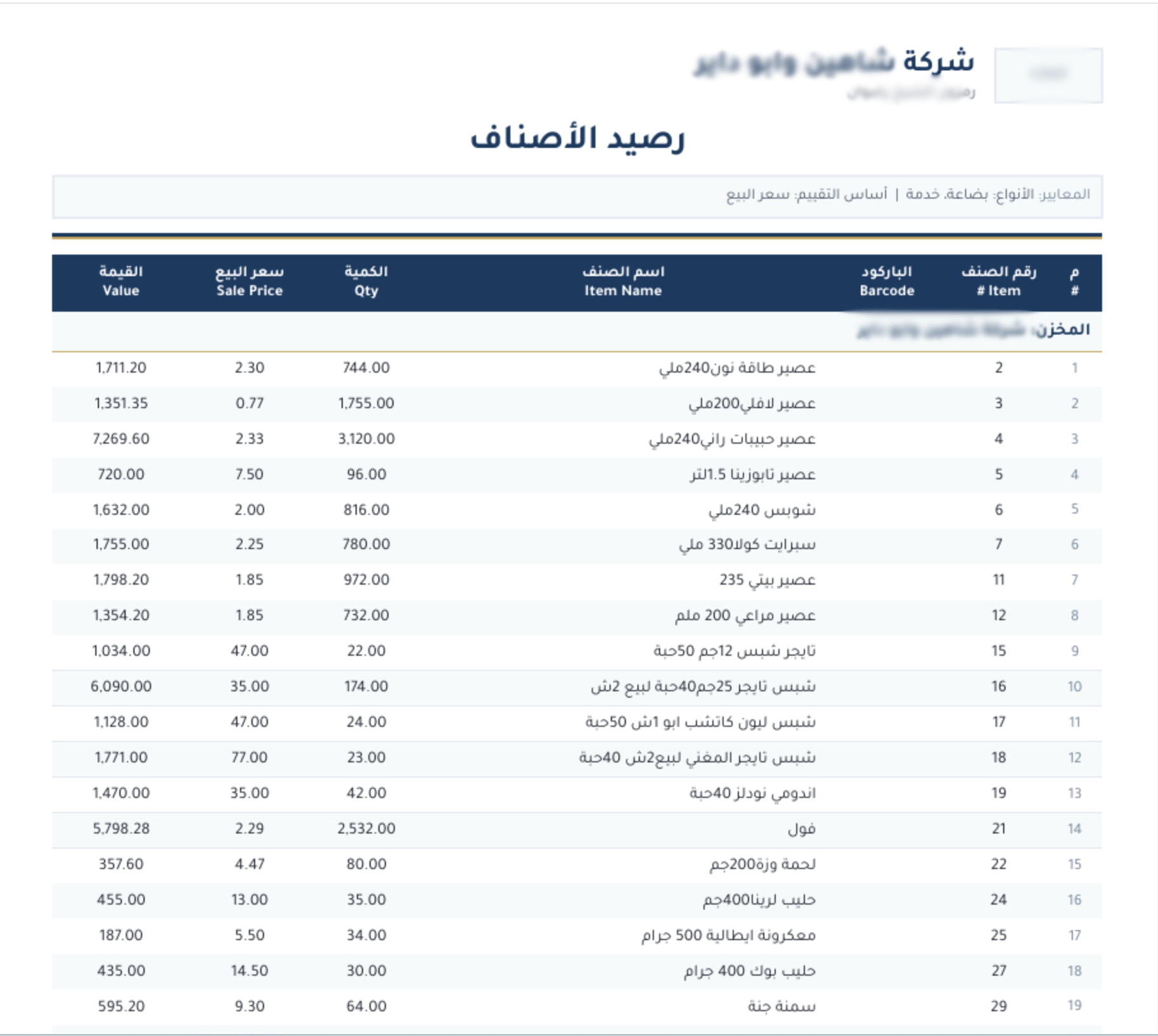
Stock balance — Sonbola Windows
Stock balance
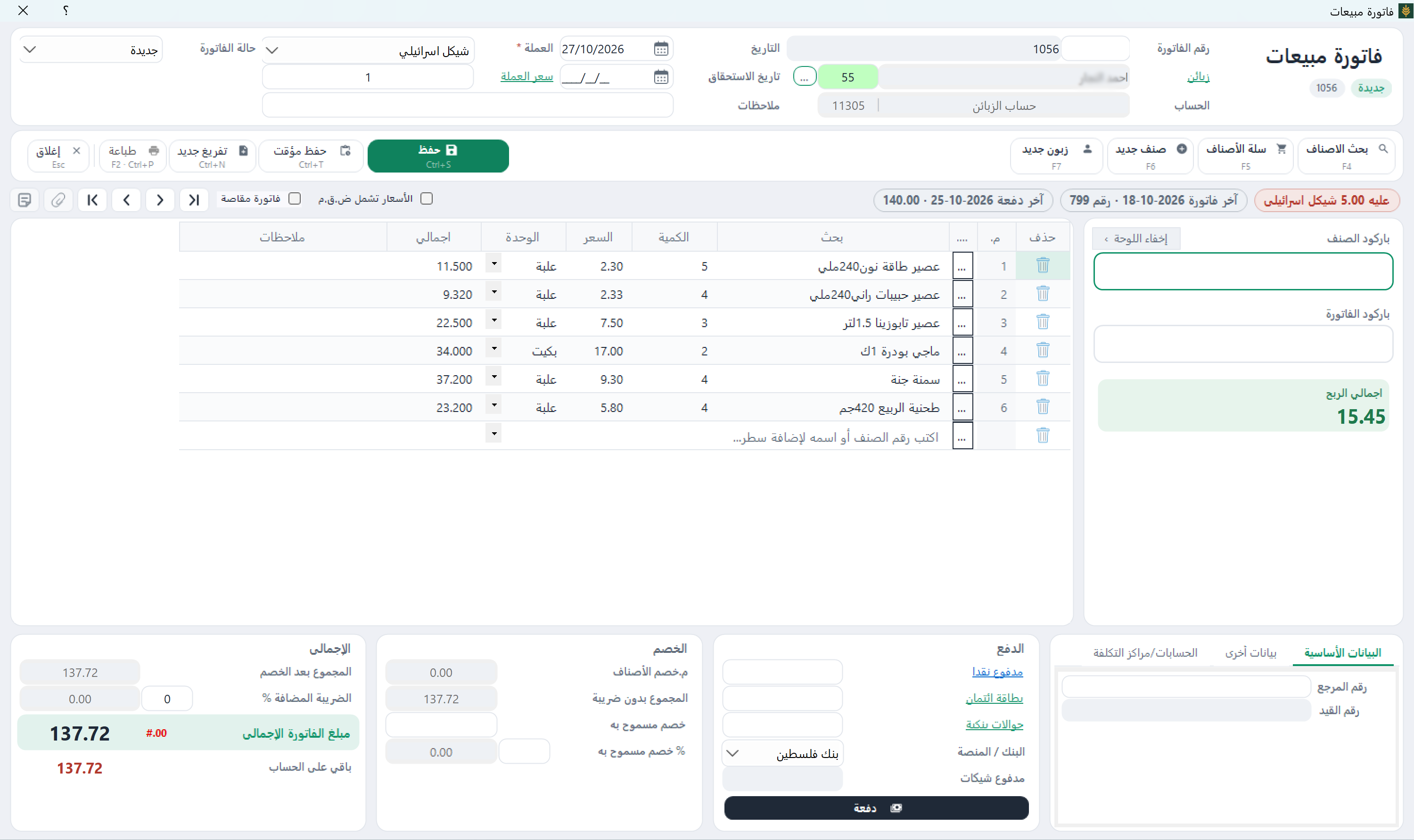
Sales invoice — Sonbola Windows
Sales invoice
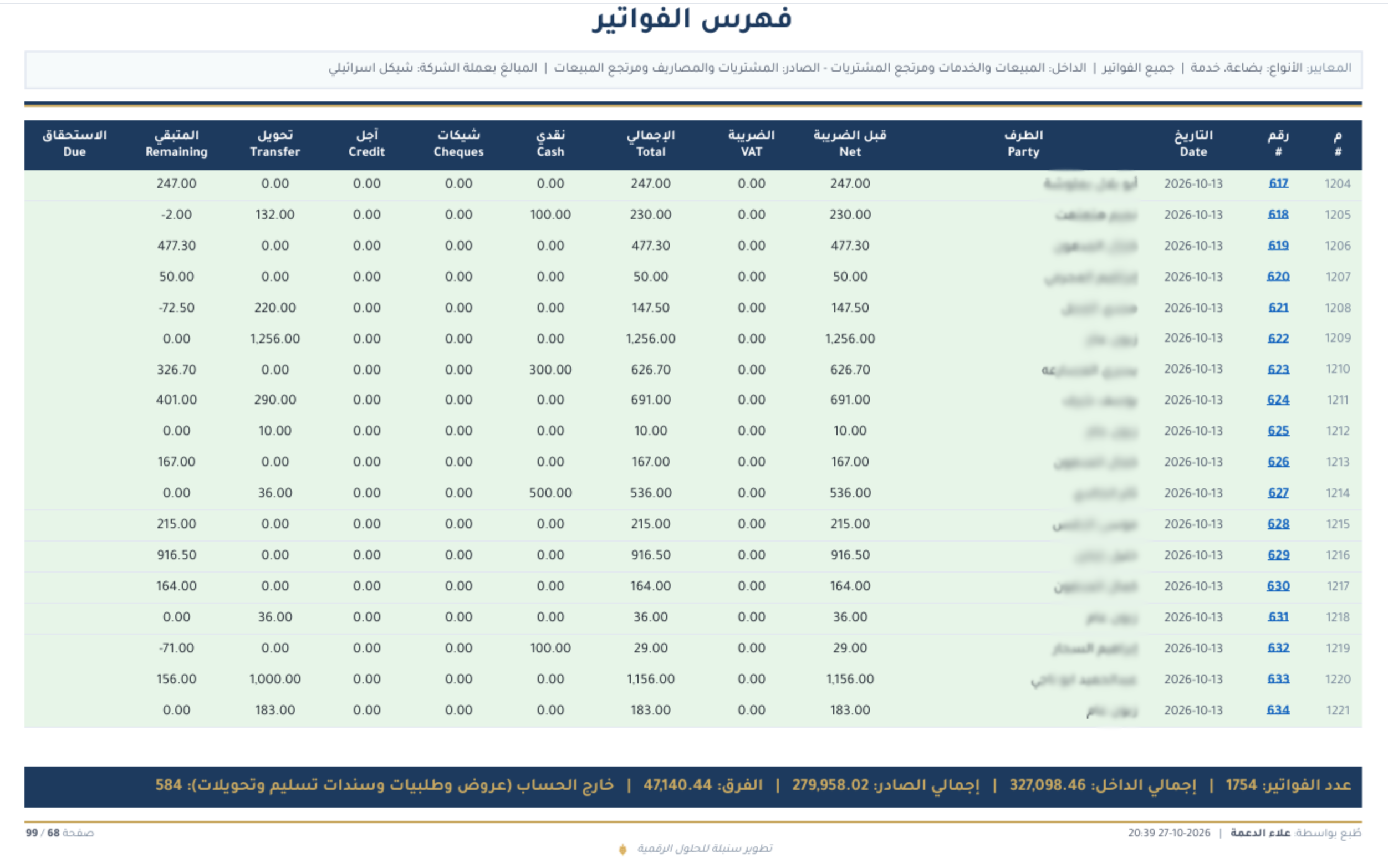
Invoice index — Sonbola Windows
Invoice index

Example: checking medicine stock before reordering

Illustrative example, not a customer case study.

Illustrative figures: recorded stock is 18 boxes and a physical count finds 16, a difference of 2 boxes. Enter 16 as the actual count on the stocktake voucher and Sonbola adjusts the store balance by the difference when you save. Before ordering from the supplier, open the expiry report to see which batches of the same medicine are close to expiry.

More questions before trying

Do these screenshots document medicine batch and expiry setup?

No; the screenshots above are general screens with grocery data. Medicine expiry appears in the expiry report, with each item’s batches and dates, and in the alerts screen under “items close to expiry”.

Does accounting software cover clinical requirements?

Sonbola is accounting, sales and inventory software: sales, stock, expiry dates and supplier accounts. Prescription management and insurance are not among its features; if you need them, write to us and we will tell you what it covers.

Explore Sonbola AI for questions about sales, profit, stock and customer balances. Answers depend on available reports and permissions; review them before acting. Explore Sonbola AI.

Questions about running Sonbola and arranging training

Does Sonbola work without internet?

Sonbola runs locally on a Windows computer or a local network without an internet connection. The computer still needs electricity. Message sharing, cloud backups and remote connections require internet access, depending on the service.

How do I arrange training and choose an edition?

Contact us to discuss your business needs and the right edition, then arrange training availability and scheduling in your area. Training is currently free. A 30-day trial is available; features vary by edition.