Supermarket POS software and grocery store accounting
Fast sales at the cash register, customer debts in order, and stock that you know when it runs out — in a program that supports Arabic and English in the interface, reports and invoices, and continues to work even if the Internet is cut off.
Supermarket POS software that keeps the queue moving
A supermarket has its afternoon queue; a grocery has its neighbourhood debt book. Sonbola brings the cashier, stock, customer debts and the accounts together in one program that runs on Windows without the internet.
Barcode cashier
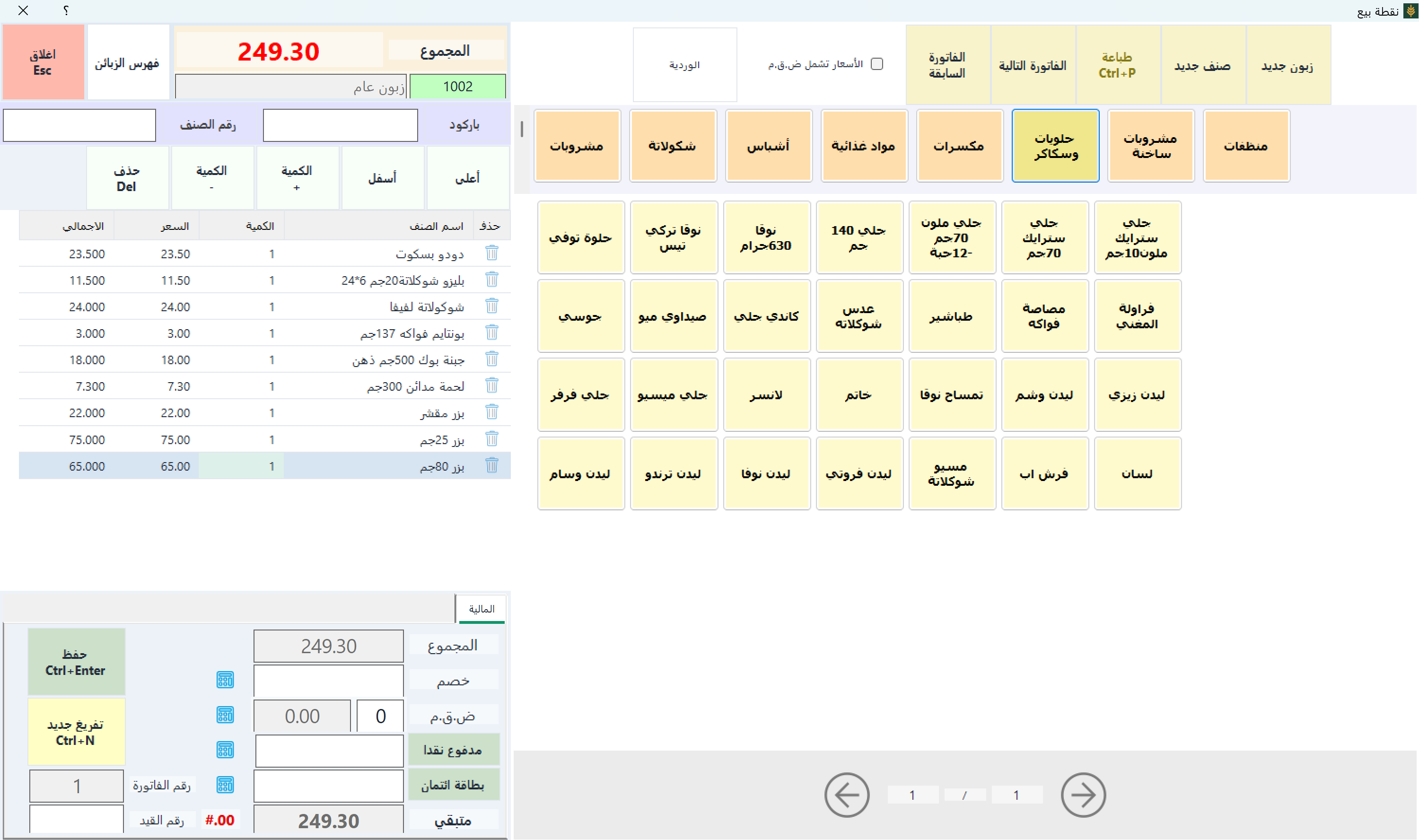
The cashier scans item after item without touching the mouse, types what the customer paid, then Ctrl+S. A customer forgot his wallet? Ctrl+T parks the invoice so you serve the next one; a parked invoice does not reduce stock. The cashier invoice
Unit and carton
The main unit is the “can” with the factory barcode, and a “carton” of 24 is added on the Units tab: buy by the carton, sell by the can, and the balance stays right (Trade edition). Adding items
The neighbourhood debt book
Each customer has an account and a credit limit, say 300, with “warn and allow”, so the cashier knows when to ask for payment; the statement can be sent by WhatsApp. Credit limits and cash-only customers
Two cashiers, two shifts
Each cashier opens a shift with a float and closes it with a Z report the owner settles with, and an X report mid-shift shows a shortage early. Opening and closing a shift
Situations that every supermarket or grocery owner knows, and how Sonbola deals with them.
Long line at the till
Cashier screen With barcode Multiple payment methods, with a thermal printer for quick delivery.
Paper debt book
An account for each customer with his current balance, and Account statement You send it to him Via WhatsApp or by text message From within the program, with the debt aging report.
Box does not match sales
Closing the cashier shift and matching the cashier At the end of each shift, with permissions that define what each employee can do.
Empty shelves and stagnant items
Reorder limit alert And a report on the best-selling items and the profits of each item.
Advantages of interest to supermarkets and groceries
Labels and barcodes
Print item labels, use product barcodes or generate barcodes for items that don't carry them.
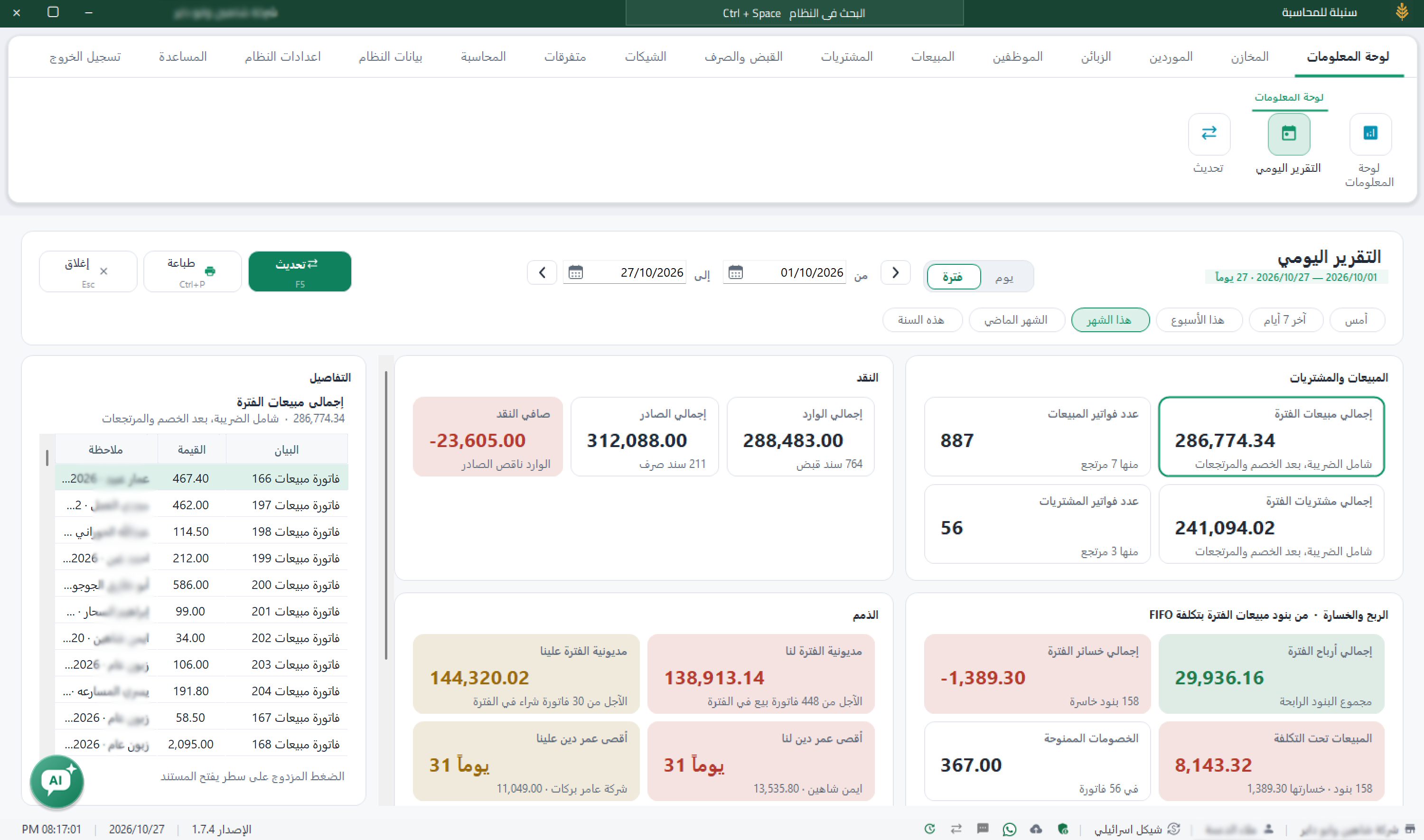
Information panel
Sales, profits, cash and debt at one glance.
Customer debts
A detailed statement of account for each customer, and a report showing who was late in paying and how long ago.
Multiple prices
Up to five selling prices for the item, and a default pricing level for each customer, such as a wholesaler and a retail customer (“trade” edition).
Validity and units
Track the batch and expiry date of food items, and multiple units such as cartons and pills (trade edition).
Works without internet
The sale continues when the internet goes out, with a backup on Google Drive. How does it work?
The right edition for your shop
220 dollars annually
“POS” edition
For groceries and stores that need to sell using barcodes, simple inventory, customer debts, and sales reports. If you need multiple prices, units for the item, expiry dates tracking, or more than one warehouse, the “Tijara” edition for $380 annually is the most appropriate. Compare versions
Which version of Sonbola suits your shop?
In a supermarket you sell from the counter all day, you may count the shelves after closing, and you might follow the shop while you are away. That is why Sonbola comes in three versions: they differ in where you work and how your day runs, not in your line of business.
Sonbola Desktop
Installs on a Windows PC and runs locally with no internet, with your data on your own machine or server. Best when you work from one fixed place and sell from a device there. 30-day trial, or 500 invoices, whichever comes first.
Runs in the browser with nothing to install, so you reach your accounts from any connected device. Best when you follow your business from outside the premises or from more than one device. 14-day free trial.
A companion app for stocktaking from your phone and syncing it, and for using the phone's SIM as a gateway for the program's messages. It links to the desktop version or to Sonbola Web according to your company setup.
Sonbola AI is available in the Web and Windows plans. Features and setup vary by version, plan and permissions; compare the ways of working or ask the team what suits your business.
Frequently asked questions
What is the best supermarket POS software?
Software that sells by barcode without touching the mouse, parks a customer’s invoice to serve the next one, closes each cashier’s shift with a Z report, and keeps selling when the internet is down. Sonbola does all of this together with stock and accounting, and you can try it free for 30 days.
Is Sonbola good grocery store accounting software for a small shop?
Yes. The POS edition, $220 a year, covers barcode sales, simple stock, customer debts and sales reports. A paper debt book moves in with one journal voucher: a line for each customer and one line for the opening balances in total.
How do I move my grocery items from my old program?
Export the items from the old program to Excel, then import them into Sonbola with prices, barcodes and quantities; they come in as one opening voucher for the whole stock.
Will the sale continue if the Internet is cut off?
Yes. The program and your data are on the store’s device, so sales and issuing of receipts do not stop when the Internet is cut off.
Can I operate more than one box?
Yes. In LAN mode, multiple devices are running the same data at the same time, and each additional device is added by a $60 annual subscription.
How do I send the customer his debt account?
From the customer’s account statement, send it via WhatsApp or via SMS from within the program, so that he stays up to date with his balance.
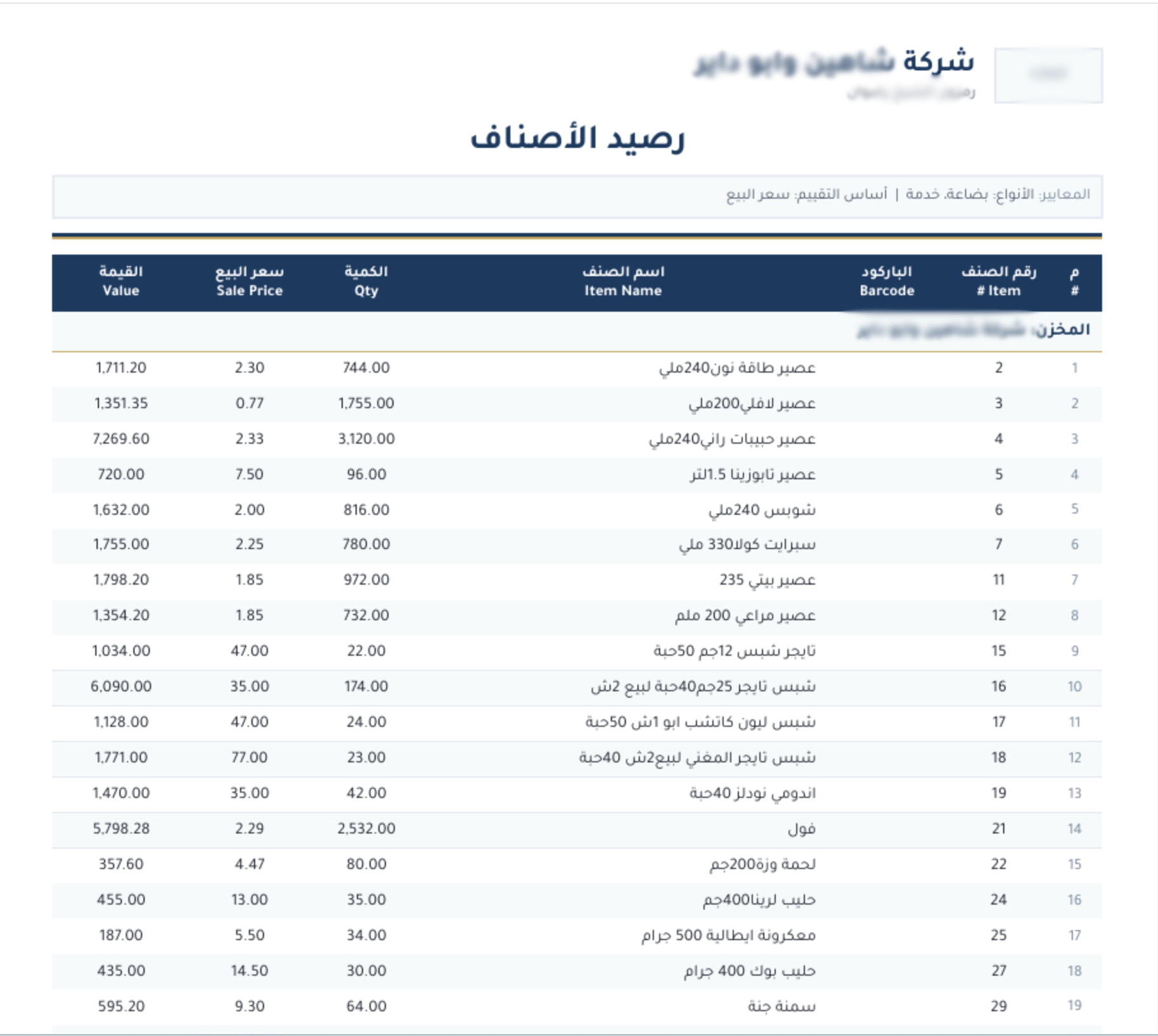
Actual Windows screenshots with grocery data in Arabic, illustrating general workflows. They are not sector-specific records or proof of every feature.
Point of saleDaily reportStock balance
Example: buying cartons and selling pieces
Illustrative example, not a customer case study.
Illustrative figures: a carton contains 24 units. Buying 2 cartons adds 48 units; selling 7 leaves 41, assuming no other movements. Define a “carton” of 24 on the item’s Units tab and Sonbola does this conversion itself on every purchase and sale, while the shift report matches cash and card in the drawer.
More questions before trying
How do I start selling at the till on day one?
Open the shift with the opening cash in the drawer, scan each item’s barcode, type what the customer paid in cash or by card, and save. At the end of the shift count the drawer, enter the counted cash, then close the shift and print the Z report.
Do sales equal the cash in the drawer?
Not necessarily; credit sales, card payments and returns change the figure. That is why Sonbola puts each amount in its own account, cash and card, so you match the drawer against the counted cash when you close the shift.
Explore Sonbola AI for questions about sales, profit, stock and customer balances. Answers depend on available reports and permissions; review them before acting. Explore Sonbola AI.
Questions about running Sonbola and arranging training
Does Sonbola work without internet?
Sonbola runs locally on a Windows computer or a local network without an internet connection. The computer still needs electricity. Message sharing, cloud backups and remote connections require internet access, depending on the service.
How do I arrange training and choose an edition?
Contact us to discuss your business needs and the right edition, then arrange training availability and scheduling in your area. Training is currently free. A 30-day trial is available; features vary by edition.