Sonbola SONBOLA

Home / Sector solutions / Clothing stores

Cashier and accounting software for clothing and shoe stores

From the sales box in the exhibition to the warehouse and branches: Sonbola arranges sales, returns and inventory in one Arabic program.

Cashier software for clothing stores: fast sales and stock for every size

In a clothing store it is not enough to know how much you sold; you need to know how many navy shirts in size L are left before you order the season's stock. Sonbola brings the cashier, stock and accounts together in one Windows program that works without internet.

Every size and colour with its stock

Make each size and colour an item with its own barcode, such as "Navy shirt - L", so the stock of the size actually sold goes down. If describing the model is enough for you, add "Size" and "Colour" as two custom fields. How to add items (Arabic guide)

Barcode cashier

Scan the barcode and the piece drops into the invoice; take cash or card, the change shows for the customer, then print the thermal receipt. Selling at the point of sale

Exchanges and returns

A return invoice linked to the sale, so the size goes back into stock and the amount is refunded or taken off the exchange invoice. Sales returns

Shift closing

At the end of the day the cashier matches the till with the shift's sales, so you see any shortage or surplus at once. Closing the shift

Try Sonbola in your store for 30 days · Download the clothing item list in Excel

What the clothing store needs

Four situations that every clothing store owner knows, and how Sonbola deals with them.

Seasons and queues

Cashier screen With barcode Multiple payment methods and printing Item labels .

Returns and exchanges

Bills Sales returns , with Closing the shift and reconciling the cash register At the end of the day.

More than one branch

Connecting branches On a shared server, it follows the movement of each branch and extracts A consolidated report The goods are transported between warehouses.

Special requests and details

Quotations and sales orders They are transformed into invoices, so no order is lost between departments.

We have several branches, and clothing design requests come to different departments, and I used to get lost between them. The program enabled me to fulfill every request on time and with the right design, and to manage the work properly.
Uniform Fashion Company Design and sale of clothing - several branches

Advantages of interest to clothing stores

permissions by branch

Restrict the employee to a specific warehouse or branch, and specify what he can view and what he can modify.

Best seller

Reports of best-selling items and profits for each item, for more accurate purchasing decisions.

Customer debts

An account statement for each customer, and send it via WhatsApp or text message.

Expenses

Expense invoices are recorded on its accounts, to know the store's net profit.

Information panel

Sales, profits, cash and debt at one glance.

Works without internet

The Windows desktop version runs locally without internet. Shared-server access across locations and connected services require the appropriate connection. How does it work?

The right edition for your shop

From 220 dollars annually

“POS” for a single store, and “Trade” for warehouses

One store is sufficient to issue a cash register ($220 annually). If you have one or more warehouses and transfers between them, the “Trade” edition is available ($380 annually), and connecting branches in different regions is added at $200 annually, with a separate hosting cost. Compare versions

Which version of Sonbola suits your shop?

In a clothing shop you sell from the counter, you count sizes and colours in the stockroom, and you may be following more than one branch. That is why Sonbola comes in three versions: they differ in where you work and how your day runs, not in your line of business.

Sonbola Desktop

Installs on a Windows PC and runs locally with no internet, with your data on your own machine or server. Best when you work from one fixed place and sell from a device there. 30-day trial, or 500 invoices, whichever comes first.

About the desktop version

Sonbola Web

Runs in the browser with nothing to install, so you reach your accounts from any connected device. Best when you follow your business from outside the premises or from more than one device. 14-day free trial.

About Sonbola Web

Sonbola Android

A companion app for stocktaking from your phone and syncing it, and for using the phone's SIM as a gateway for the program's messages. It links to the desktop version or to Sonbola Web according to your company setup.

About the Android app

Sonbola AI is available in the Web and Windows plans. Features and setup vary by version, plan and permissions; compare the ways of working or ask the team what suits your business.

How do you choose cashier software for clothing stores?

Whether you are looking for clothing-store cashier software, a clothing POS system, or clothing-store management software, check this list in the shop before you decide. A real trial is clearer than any written comparison.

Stock for every size and colour

A single model quantity is not enough. You should see what remains of each size and colour, and a barcode sale should reduce the correct size.

Exchanges and returns

A return should restore the size to stock and stay linked to the original invoice, not be typed in by hand with no stock effect.

Shift close and branches

At the end of the day the drawer should match the sales. If you have more than one branch, you need a combined report and staff limited to their own branch.

Offline use, then a trial

The desktop edition runs locally on Windows without internet. Try the software free for 30 days on your own stock before you subscribe.

Sonbola combines the cashier, stock and accounts in one program. Try it free for 30 days · Download the clothing items Excel list

Frequently asked questions

What is the best cashier software for clothing stores?

One that sells by barcode quickly, knows the stock of every size and colour, handles exchanges and returns, closes the shift, and brings branches into one report. Sonbola combines this with accounting, and you can try it free for 30 days.

How do I track the stock of every size and colour in Sonbola?

Make each size and colour an item with its own barcode, such as "Navy shirt - L", so every size has its own stock. If one balance for the model is enough for you, add size and colour as two custom fields that appear on the item card and in search.

Does the cashier software work without internet?

Yes. The Windows edition runs locally without internet. Linking branches in different locations on a shared server needs a connection.

Can I connect my branches in different cities?

Yes. By adding linking branches ($200 annually), the data is saved on a shared server, tracking the movement of each branch and extracting a unified report, and the hosting cost is calculated separately.

Does the software print barcode labels?

Yes. Prints item labels, works with any standard barcode reader, and prints an A4 invoice or small thermal receipt.

Is it possible to restrict the employee of each branch to his branch?

Yes. An employee can be restricted to a specific warehouse or branch, with precise permissions for what he views and what he edits.

Is Sonbola clothing-store management software or only a cashier?

Sonbola combines the cashier with stock and accounting: stock for every size and colour, exchanges and returns, shift close, customer debts and expenses. The Cashier edition suits a single shop, and Trade suits a warehouse or transfers between stores.

What does Sonbola’s clothing POS system include?

It sells by barcode, tracks stock for every size and colour, handles exchanges and returns, closes the shift, and prints item labels. If you have branches, you follow their movement in one report.

Does clothing-store accounting software suit one shop and several branches?

Yes. A single shop can use the Cashier edition. If you have a warehouse or more than one branch, use Trade, and add branch linking on a shared server when the shops are in different locations.

How do I start a trial of cashier software for clothing stores?

Download the desktop edition from the download page and try it free for 30 days. Define each size as an item with its barcode, or import the list from Excel, then sell two pieces, return one, and review the stock of each size.
Try Sonbola in your store for 30 days

Full version with all features, without payment card. Tell us how many branches you have, and we will guide you to the appropriate setup.

Or browse Video tutorials .

Prepare your clothing product list

Download 96 suggested clothing combinations, organised by model, colour and size. Keep what you sell and complete your actual product data.

Explore the software screens

Actual Windows screenshots with grocery data in Arabic, illustrating general workflows. They are not sector-specific records or proof of every feature.

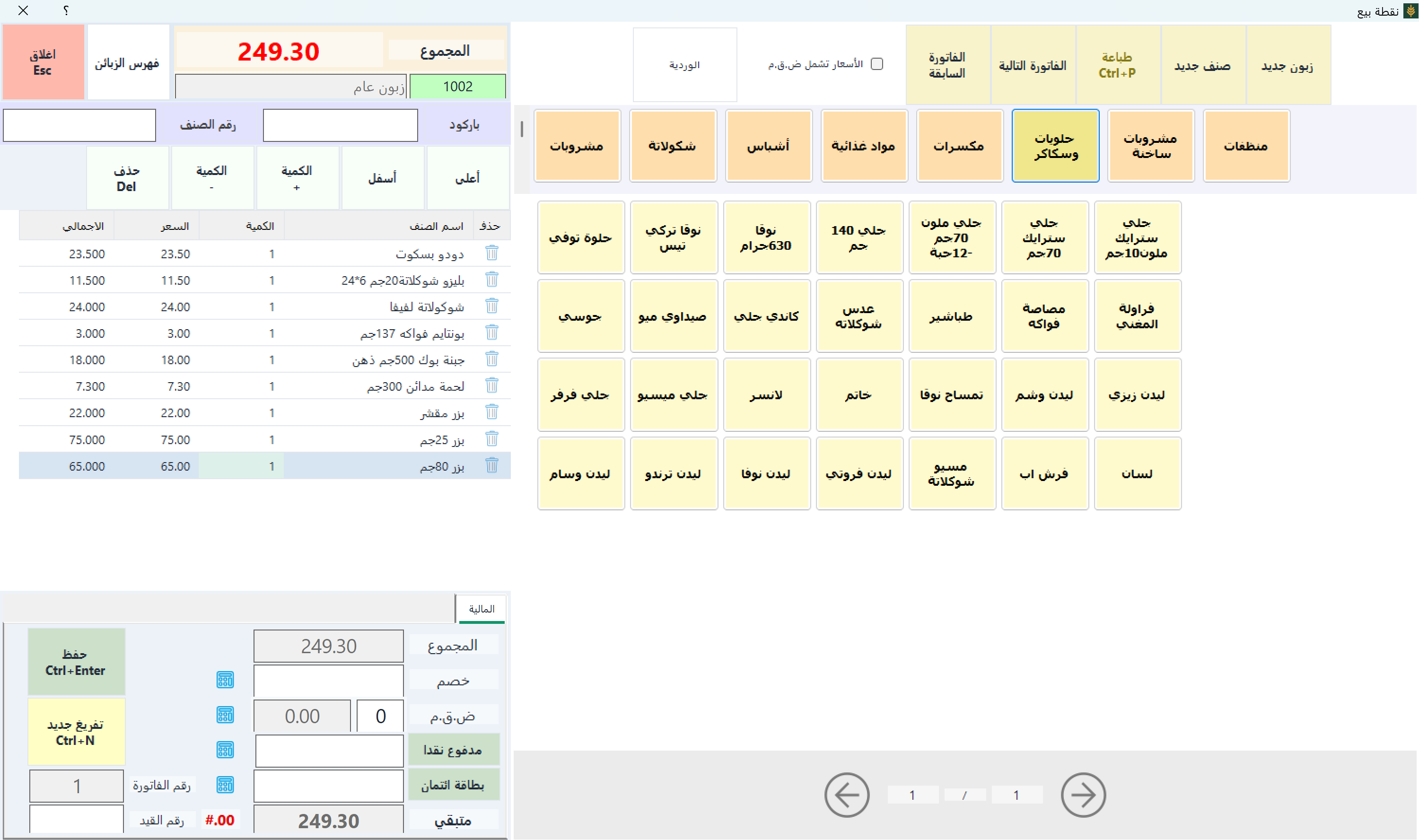
Point of sale — Sonbola Windows
Point of sale
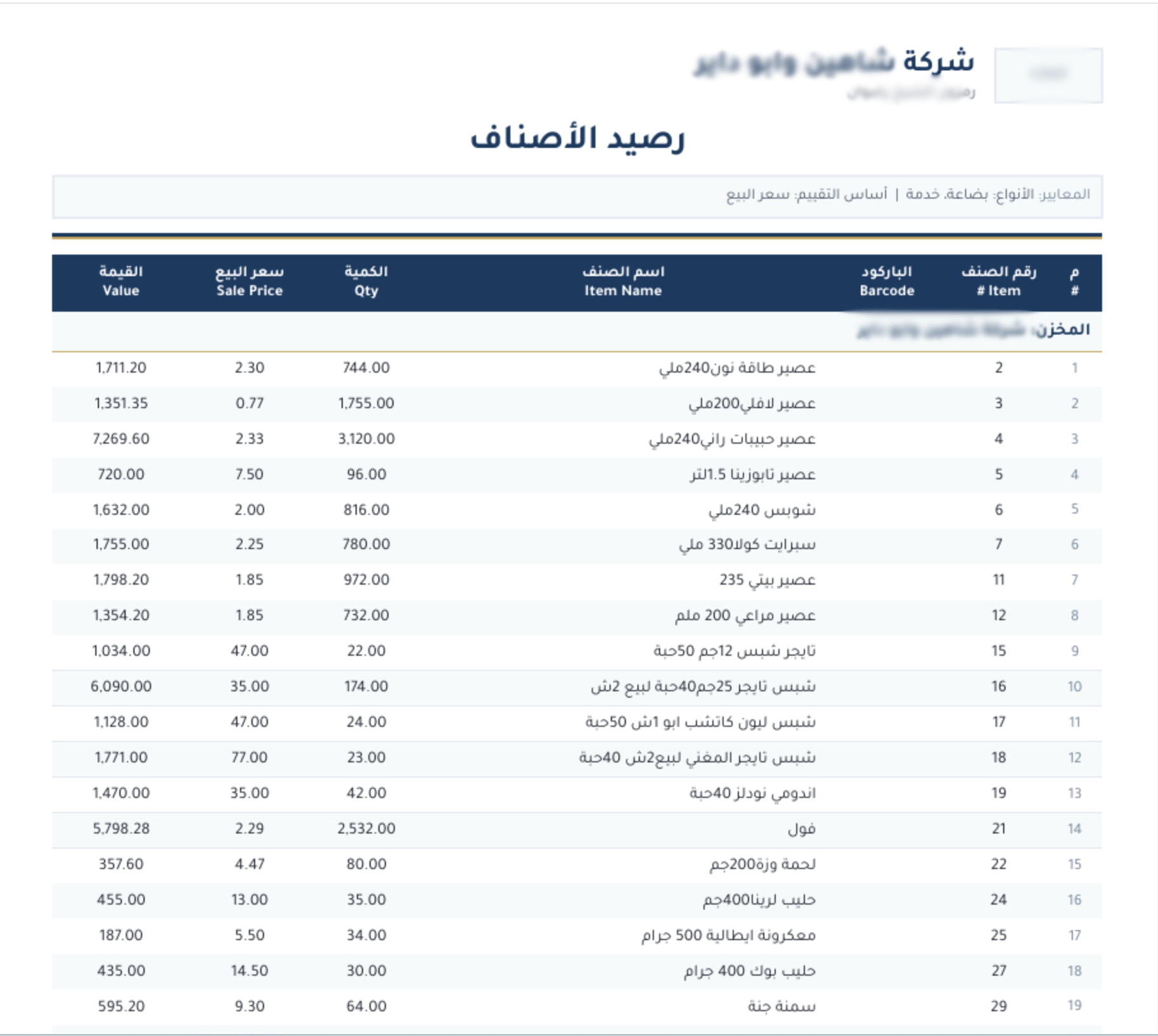
Stock balance — Sonbola Windows
Stock balance
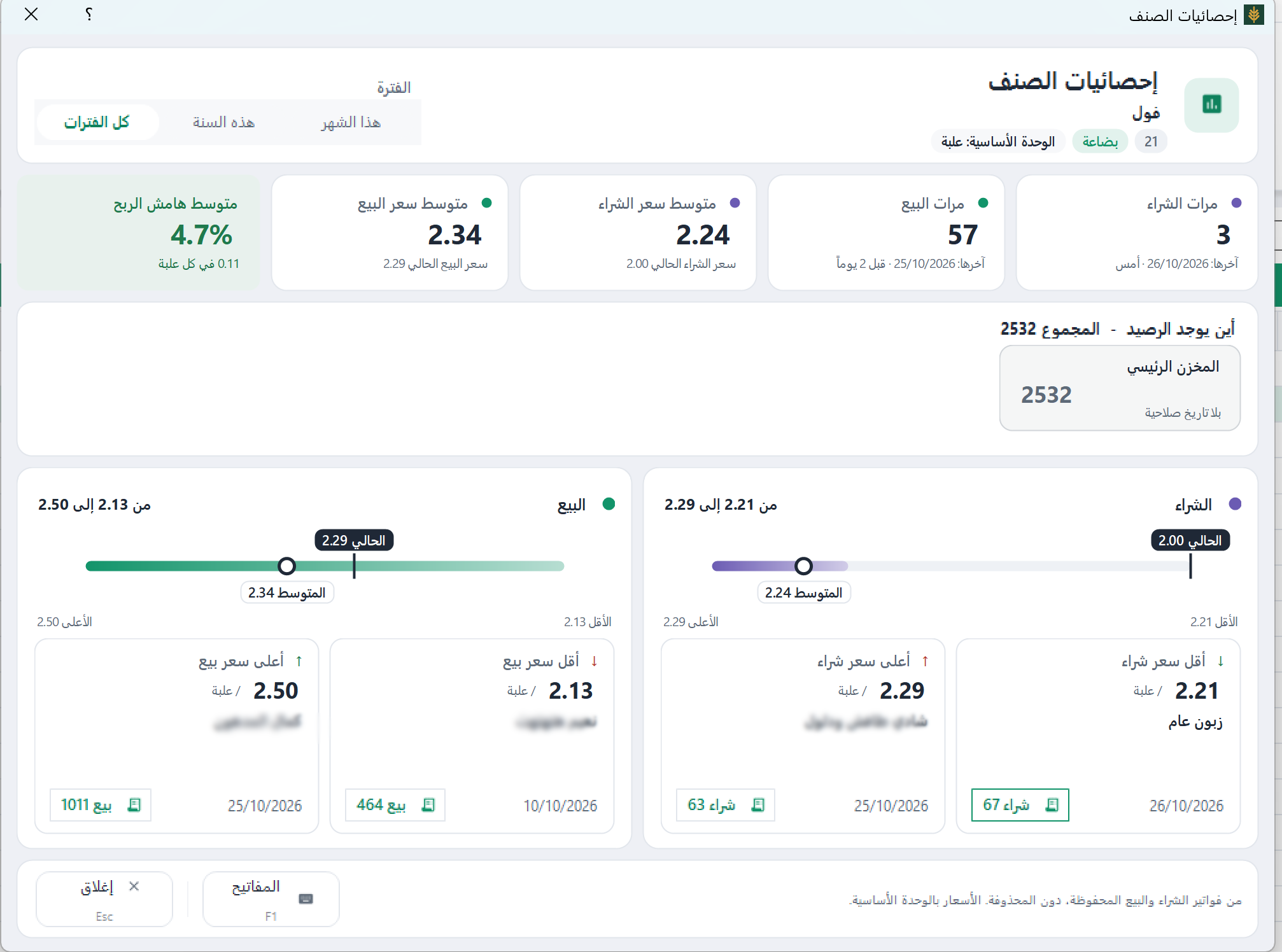
Item statistics — Sonbola Windows
Item statistics

Example: one clothing model in different sizes

Illustrative example, not a customer case study.

Illustrative figures: you have 12 units in size M and 8 in size L. Selling 3 units of M leaves 9, while L remains at 8, assuming no other movements. Use clear item definitions and distinct barcodes for stock tracked separately, and review the stock report rather than only the model total.

More questions before trying

How do I test size and colour setup?

Set up one model from your stock with its sizes: each size an item with its own barcode. Then sell two pieces, return one, and check the stock of each size in the stock balance report. Sonbola does not generate sizes and colours automatically from a grid; you define them as items or import their list from Excel.

Does the clothing list include market prices?

No. The suggested list is a starter template, not market prices or your actual inventory. Add your own data before using it.

Explore Sonbola AI for questions about sales, profit, stock and customer balances. Answers depend on available reports and permissions; review them before acting. Explore Sonbola AI.

Questions about running Sonbola and arranging training

Does Sonbola work without internet?

Sonbola runs locally on a Windows computer or a local network without an internet connection. The computer still needs electricity. Message sharing, cloud backups and remote connections require internet access, depending on the service.

How do I arrange training and choose an edition?

Contact us to discuss your business needs and the right edition, then arrange training availability and scheduling in your area. Training is currently free. A 30-day trial is available; features vary by edition.