Sonbola SONBOLA

Home / Sector solutions / Furniture and appliances showrooms

Management and accounting software for furniture showrooms and carpentry workshops

A customer chooses a bedroom, pays a deposit, delivery two weeks later in the showroom car, and the rest is checks. Sonbola converts the price quote into a sales order and then an invoice, records each payment on the customer’s account, and works on your device without the Internet.

Furniture showroom management: from quotation to delivery

A furniture order runs for weeks: the customer picks a model, pays a deposit, the piece is prepared or made, then delivered and the balance is collected. Sonbola follows the whole journey in one place, so at any moment you know what each customer ordered, paid and still owes, and where the piece is now.

1. Quotation

Model, fabric, colour, sizes and the agreed price, printed or sent to the customer.

2. Order and deposit

The quotation becomes a sales order without retyping; the deposit is a receipt voucher on the customer's account.

3. Preparation or manufacturing

From showroom or warehouse stock, or through a manufacturing order in the workshop.

4. Delivery and collection

An invoice on delivery with transport and assembly charges; the balance in cash or dated cheques.

Guide: deposits, delivery and a furniture customer's statement

Success story: Modern Home Carpentry

Modern Home Carpentry is a carpentry workshop and furniture showroom at once, with a sales department and a manufacturing department. Its bedroom sets, sofa sets and tables take up to a month from agreement to delivery, and customers pay in instalments over that month.

Two departments, one system

Showroom sales and workshop manufacturing on the same data, so the order the salesperson takes is the one that gets made.

Instalments until delivery

Every payment on the customer's account, so the showroom knows on any day what was paid and what remains on each order.

Customers and reminders

Each customer's details and orders on their card, and reminder messages for payments due.

The workshop ran its shops on Sonbola, and it was a successful experience for both of us. Do you run a workshop or showroom like it? Try Sonbola free for 30 days

Accounting software for furniture and carpentry workshops

If you make what you sell, the key question is: what did this bedroom set really cost me? In Sonbola a manufacturing order records the raw materials that left the store, such as wood, boards, foam, fabric and handles, and the finished product that entered it, and adds labour and workshop overheads to its cost.

A recipe per product

Define the components of a bedroom set or sofa once, and Sonbola proposes them in every manufacturing order.

The real cost of each piece

Materials at cost, plus labour and overheads, so you know the profit of each piece, not only of the month.

Raw and finished stock

Wood and fabric balances drop with each order, and the finished product enters the showroom ready to sell.

Manufacturing is part of the Trade edition. Manufacturing and assembly

Sonbola fitted to your showroom: custom fields

Every workshop and showroom has its own details: wood type, fabric colour, sizes, the agreed delivery date. Add them as fields on the item, customer or invoice card, and they appear in lists, search and reports, with no custom build.

For furniture showrooms in Saudi Arabia and Jordan

E-invoicing in Saudi Arabia

Integration with ZATCA's Fatoora platform in both phases, tax and simplified invoices, and credit notes for returns. Sonbola in Saudi Arabia

Your currency and tax

The riyal or the dinar as the company currency with its tax rate, and purchases from suppliers or factories in dollars at a rate per transaction.

Remote setup and training

We prepare the software, import your items and train you remotely, in Arabic over WhatsApp.

What a furniture and appliance showroom needs

Four stages in every sale, and how Sonbola follows up on them.

Selling by order and batches

Quote With the types and specifications, it turns into Sell order Upon agreement, then to invoice upon delivery. And the deposit Receipt voucher On the customer's account, what he paid and what remains appears on his statement.

Delivery and installation

Driver and transportation fees On the invoice, and Utility bill You combine installation and delivery with the items, so you know the profit of each operation after the delivery cost.

The rest are post-dated checks

Full course For incoming checks With due dates on each customer’s account, returning the check to the supplier, and following up on the returned check (issuing “accounting”).

Showroom, warehouse, and dollar suppliers

Multiple warehouses The balance of each item in the showroom and in the warehouse, with a transfer between them, and Multiple currencies It buys from the supplier in dollars and sells in shekels at the exchange rate for each transaction.

Features showrooms care about

Barcodes and stickers

Barcode for each item, manual or automatically generated, and print item labels from the program.

Cash rate and forward rate

Up to five selling prices for an item, and a default pricing level for each customer.

Returns and exchanges

A sales return on the original invoice, so the item is returned to the balance and the customer's account is settled.

Purchase orders

A purchase order for the supplier or factory, then an associated purchase invoice and statement of account in its currency.

Item profits

Earn each item and the best-selling items, to know what deserves space in the exhibition.

Vendor permissions

Each seller sees what belongs to him, and the profits are only visible to the owner, along with the representative's commission on the invoice.

The right edition for your showroom

380 dollars annually

“Trade” edition

Includes quotations, purchase and sale orders, multiple warehouses, five prices, and service invoices with items. If you accept post-dated checks or buy in dollars, the “Accounting” edition for $499 annually is the most appropriate. Compare versions

Which version of Sonbola suits your showroom?

In a furniture showroom you sell from the floor, and the warehouse or the workshop may sit somewhere else that you need to follow. That is why Sonbola comes in three versions: they differ in where you work and how your day runs, not in your line of business.

Sonbola Desktop

Installs on a Windows PC and runs locally with no internet, with your data on your own machine or server. Best when you work from one fixed place and sell from a device there. 30-day trial, or 500 invoices, whichever comes first.

About the desktop version

Sonbola Web

Runs in the browser with nothing to install, so you reach your accounts from any connected device. Best when you follow your business from outside the premises or from more than one device. 14-day free trial.

About Sonbola Web

Sonbola Android

A companion app for stocktaking from your phone and syncing it, and for using the phone's SIM as a gateway for the program's messages. It links to the desktop version or to Sonbola Web according to your company setup.

About the Android app

Sonbola AI is available in the Web and Windows plans. Features and setup vary by version, plan and permissions; compare the ways of working or ask the team what suits your business.

Furniture showroom management software: from agreement to delivery

A search for a furniture showroom management system usually means following each order: quotation, deposit, preparation or manufacturing, then delivery and collection. Sonbola brings these steps together with showroom and warehouse stock and accounting in one program.

Track a deposit and the remaining balance · Check stock before promising delivery · Calculate the cost of a furniture order

Each customer and their order

The quotation becomes a sales order and then an invoice on delivery, and the deposit is a receipt voucher on the customer account, so you see what was paid and what remains.

Showroom and warehouse stock

You know where the piece is now, and you transfer between the showroom and the warehouse without losing the quantity promised for delivery.

If you manufacture what you sell

A manufacturing order in the workshop deducts raw materials, brings in the finished piece and calculates its cost, in the Trade edition, on the same system as the showroom.

Deposit and delivery guide · How to cost a bedroom set

Frequently asked questions

What is the best management system for a furniture showroom?

One that follows each order from quotation to delivery, records deposits and instalments on the customer account, and knows where each piece is between showroom and warehouse. Sonbola combines this with stock and accounting in one program that works online and offline; you can try it free for 30 days.

Does Sonbola suit carpentry workshops that make furniture?

Yes. A manufacturing order takes raw materials out of the store, brings the finished product in, and adds labour and workshop overheads to its cost, so you know the profit of each piece. Manufacturing is part of the Trade edition.

Does Sonbola work with e-invoicing for furniture showrooms in Saudi Arabia?

Yes. Sonbola supports integration with ZATCA's Fatoora platform in both phases, tax and simplified invoices, and credit notes for returns.

Do I register the deposit before issuing the invoice?

Yes. The advance payment is recorded with a receipt on the customer’s account, and upon delivery the invoice is issued, and what he paid and what remains is shown in his account statement.

How do I document the order before processing it?

By displaying a price that includes the items, specifications, and the agreed upon price, it turns into a sales order upon agreement, then into an invoice upon delivery, without re-entry.

Do I follow up on customer post-dated checks?

Yes. In issuing an “accounting” complete cycle for incoming checks with their due dates on each customer’s account, and assigning the incoming check to the supplier.

Is it suitable for an electrical appliances exhibition?

Yes. A barcode for each item, multiple prices for cash and credit, returns on the original invoice, suppliers in their currencies, and item profit reports.

What does Sonbola’s furniture showroom management system include?

It follows the order from quotation to sales order and invoice, records deposits and payments on the customer account, and shows the stock of each item in the showroom and the warehouse. It runs on your computer without internet, and you can try it free for 30 days.

Does furniture showroom management software suit both the showroom and the workshop?

Yes. Showroom sales and workshop manufacturing share the same data: a manufacturing order deducts raw materials, brings in the finished piece and adds labour to its cost. Manufacturing is included in the Trade edition.

How does a showroom start with furniture showroom management software?

Define your items or import the list, create a trial quotation and turn it into a sales order, record a deposit with a receipt voucher, and review the customer statement before delivery. The free 30-day trial is on the download page.
Try Sonbola in your showroom for 30 days

Full edition with all features, without payment card. Tell us what you sell and do you accept checks, and we can guide you to the appropriate edition.

Or browse Video tutorials .

Start with a furniture product list

Download an editable list of 80 furniture items, with a blank worksheet for your own products. Add your real quantities, prices and barcodes before preparing an import.

Explore the software screens

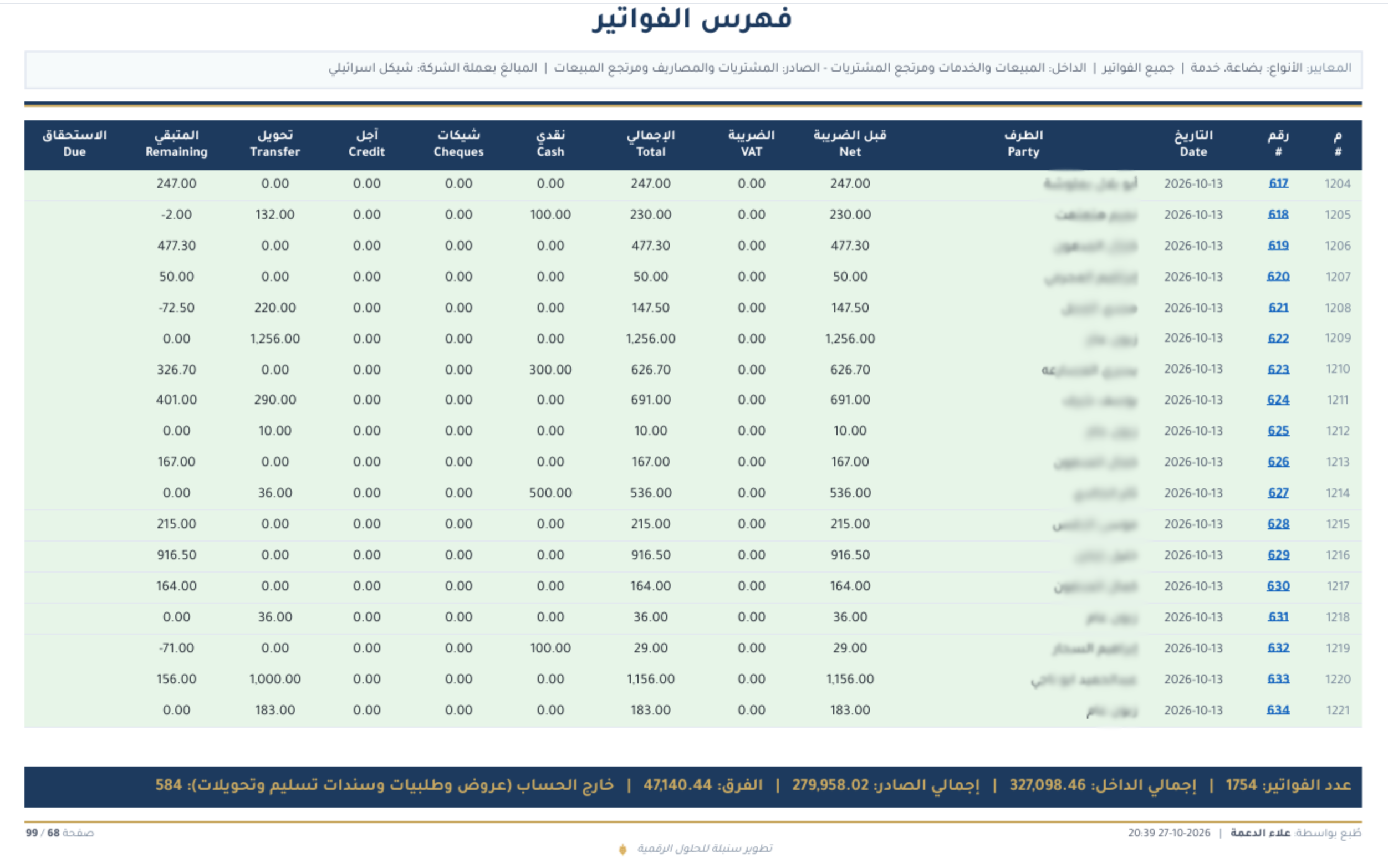
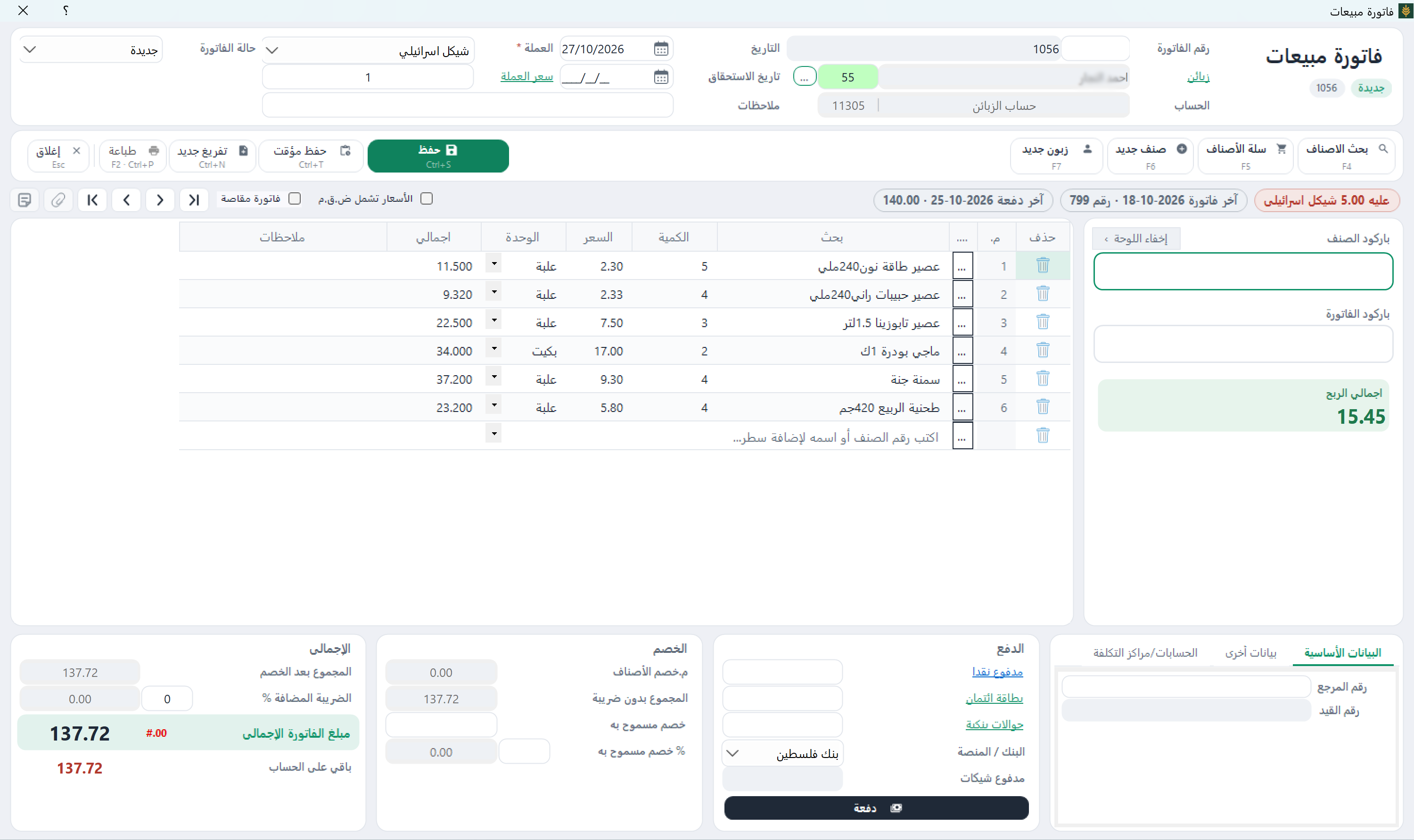
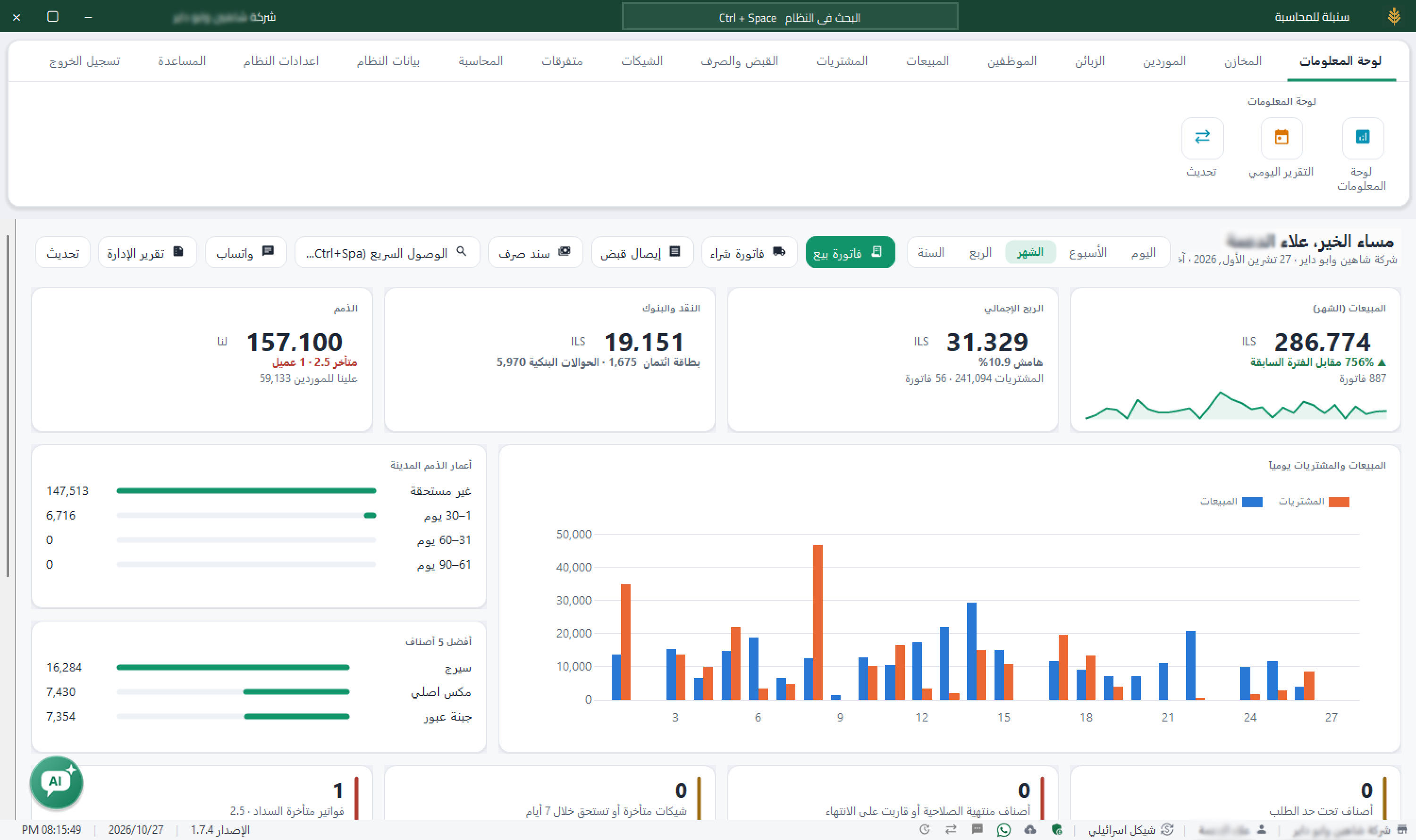
Actual Windows screenshots with grocery data in Arabic, illustrating general workflows. They are not sector-specific records or proof of every feature.

Sales invoice — Sonbola Windows
Sales invoice
Dashboard — Sonbola Windows
Dashboard
Invoice index — Sonbola Windows
Invoice index

Example: a bedroom-set deposit and the balance on delivery

Illustrative example, not a customer case study.

Illustrative figures: a showroom sells a bedroom set for 8,000 and receives a 2,000 deposit. Document the agreement in a quotation and record the receipt on the customer account. After issuing the sales invoice and reviewing the statement, the balance is 6,000, assuming no other transactions. Review delivery, installation and later payments separately; a deposit alone is not profit.

More questions before trying

What should I review before delivering furniture?

Check the agreed items, specifications and quantities, warehouse stock, the recorded deposit and customer statement. For postdated cheques, check due dates and the edition supporting cheque tracking.

Does the furniture product list replace my own setup?

No. It is an editable starting point. Supply your actual models, prices, quantities and barcodes, then review the import method for your edition.

Explore Sonbola AI for questions about sales, profit, stock and customer balances. Answers depend on available reports and permissions; review them before acting. Explore Sonbola AI.

Questions about running Sonbola and arranging training

Does Sonbola work without internet?

Sonbola runs locally on a Windows computer or a local network without an internet connection. The computer still needs electricity. Message sharing, cloud backups and remote connections require internet access, depending on the service.

How do I arrange training and choose an edition?

Contact us to discuss your business needs and the right edition, then arrange training availability and scheduling in your area. Training is currently free. A 30-day trial is available; features vary by edition.